Redesigning Station Operations for roadsurfer: Role-Based Dashboards for Agents & Managers
Redesigning Station Operations for roadsurfer: Role-Based Dashboards for Agents & Managers
Streamlining Car Rental Station Operations: Designing Role-Specific Tools for Agents and Managers
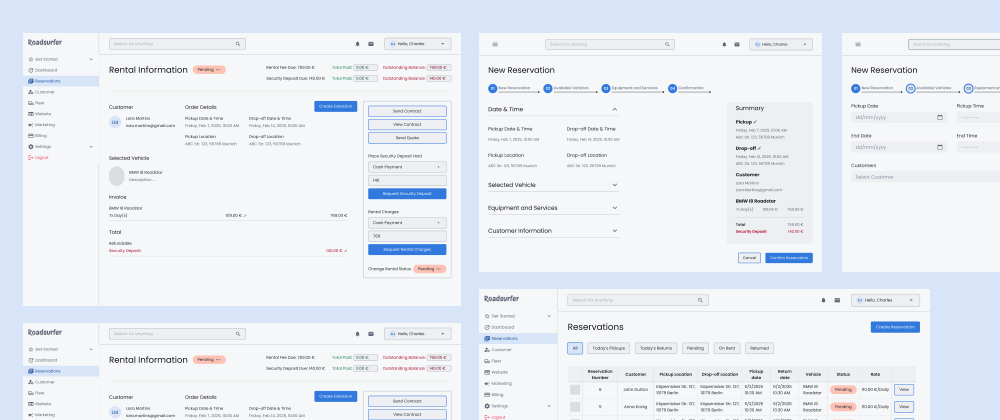
Project Overview
Project Overview
The Problem
The Problem
roadsurfer operates 200+ stations across Europe, but station agents and managers share the same generic tools — leading to role confusion, slow task delegation, and missed handoffs during peak rental periods.
roadsurfer operates 200+ stations across Europe, but station agents and managers share the same generic tools — leading to role confusion, slow task delegation, and missed handoffs during peak rental periods.
What I Delivered
What I Delivered
A role-specific dashboard system with separate agent and manager views — scoped task lists, real-time fleet status, automated handoff logic, and permission-aware UI that reduces cognitive load and eliminates workflow ambiguity.
A role-specific dashboard system with separate agent and manager views — scoped task lists, real-time fleet status, automated handoff logic, and permission-aware UI that reduces cognitive load and eliminates workflow ambiguity.
Scope
Scope
End-to-end product design — research through high-fidelity UI
End-to-end product design — research through high-fidelity UI
My Role
My Role
Desk research, user needs synthesis, journey mapping, concept development, interaction design, visual design
Desk research, user needs synthesis, journey mapping, concept development, interaction design, visual design
Context
Context
Self-initiated design exploration for roadsurfer — demonstrating how I approach complex operational tools from scratch
Self-initiated design exploration for roadsurfer — demonstrating how I approach complex operational tools from scratch
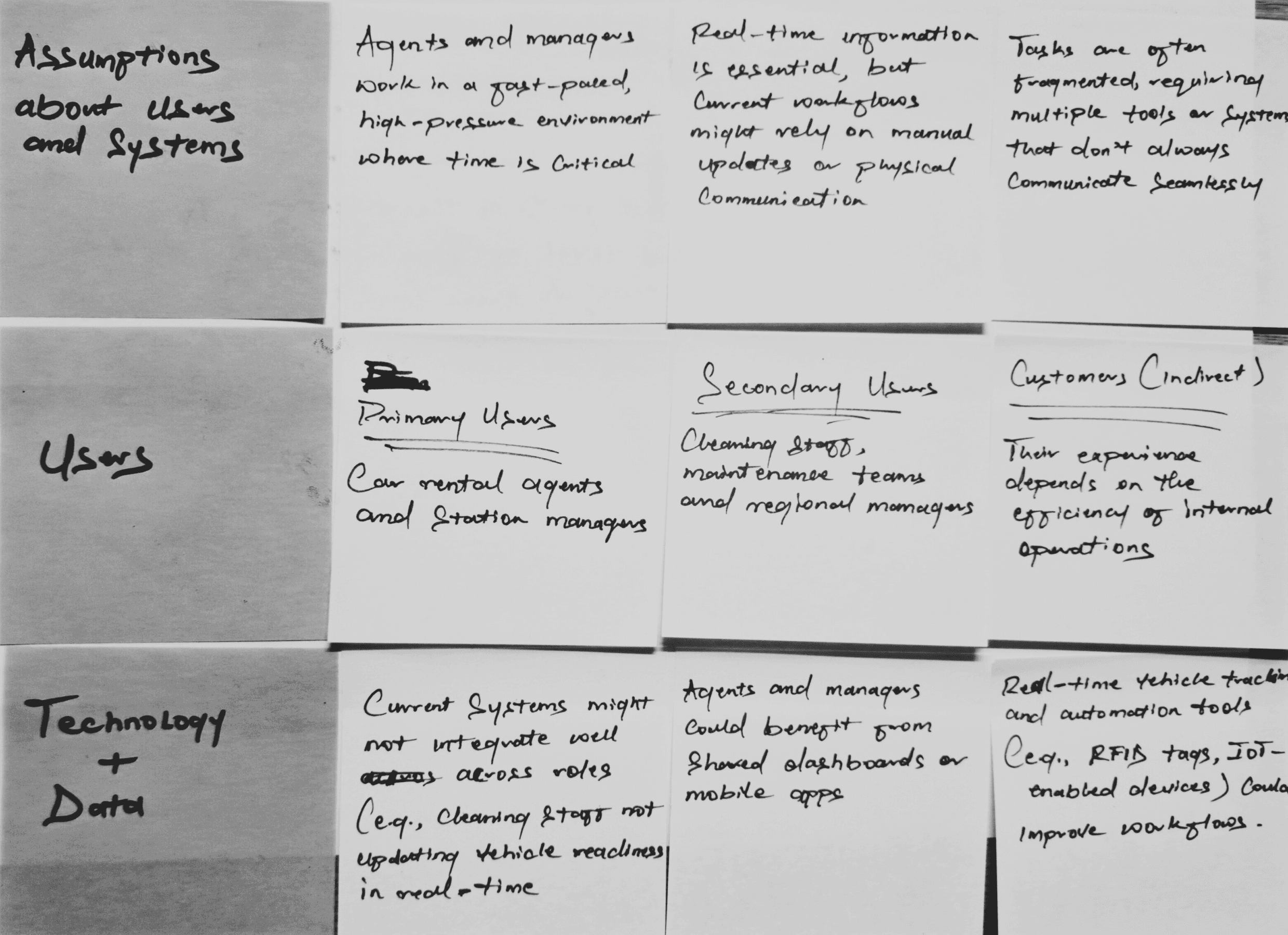
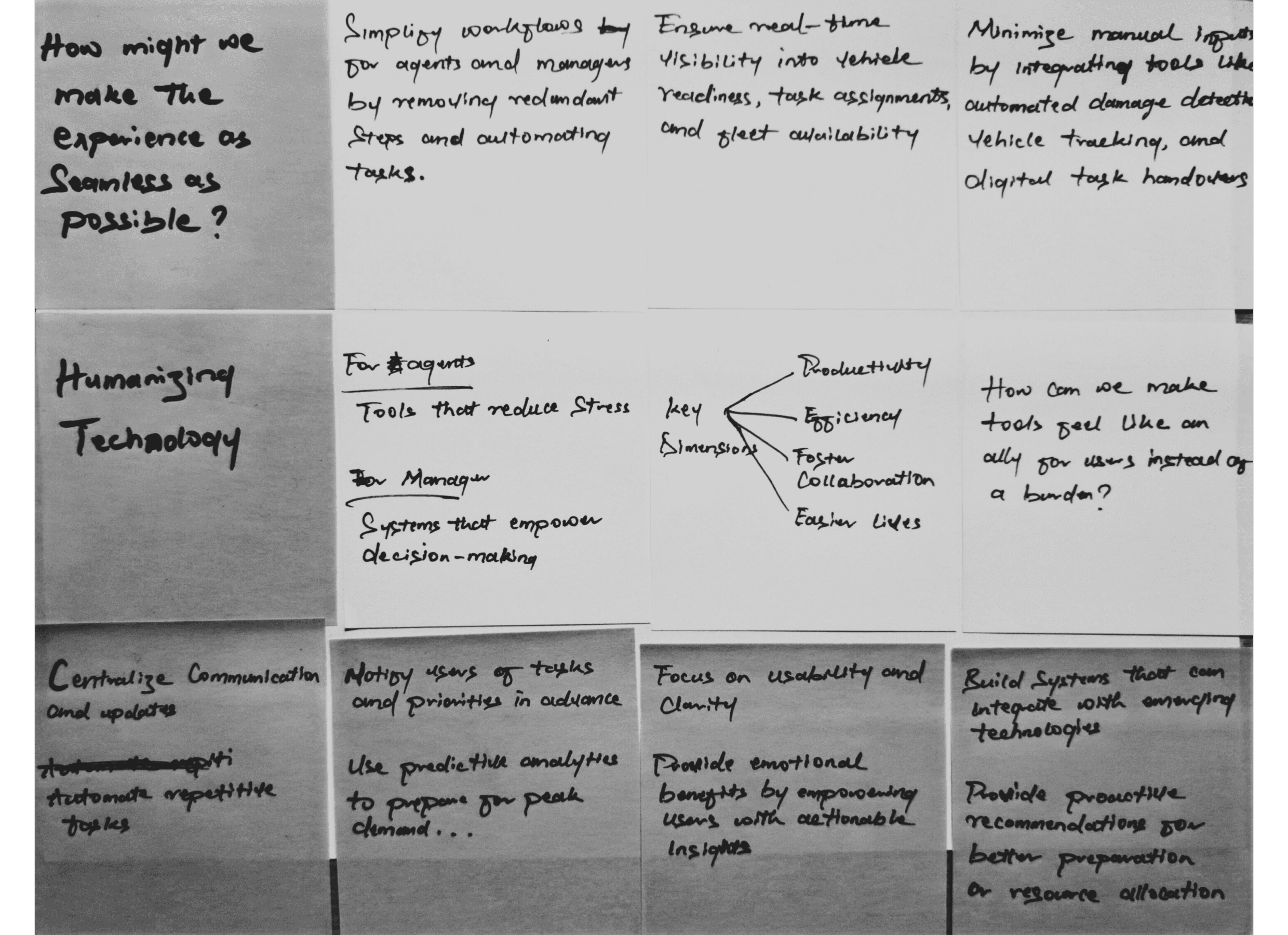
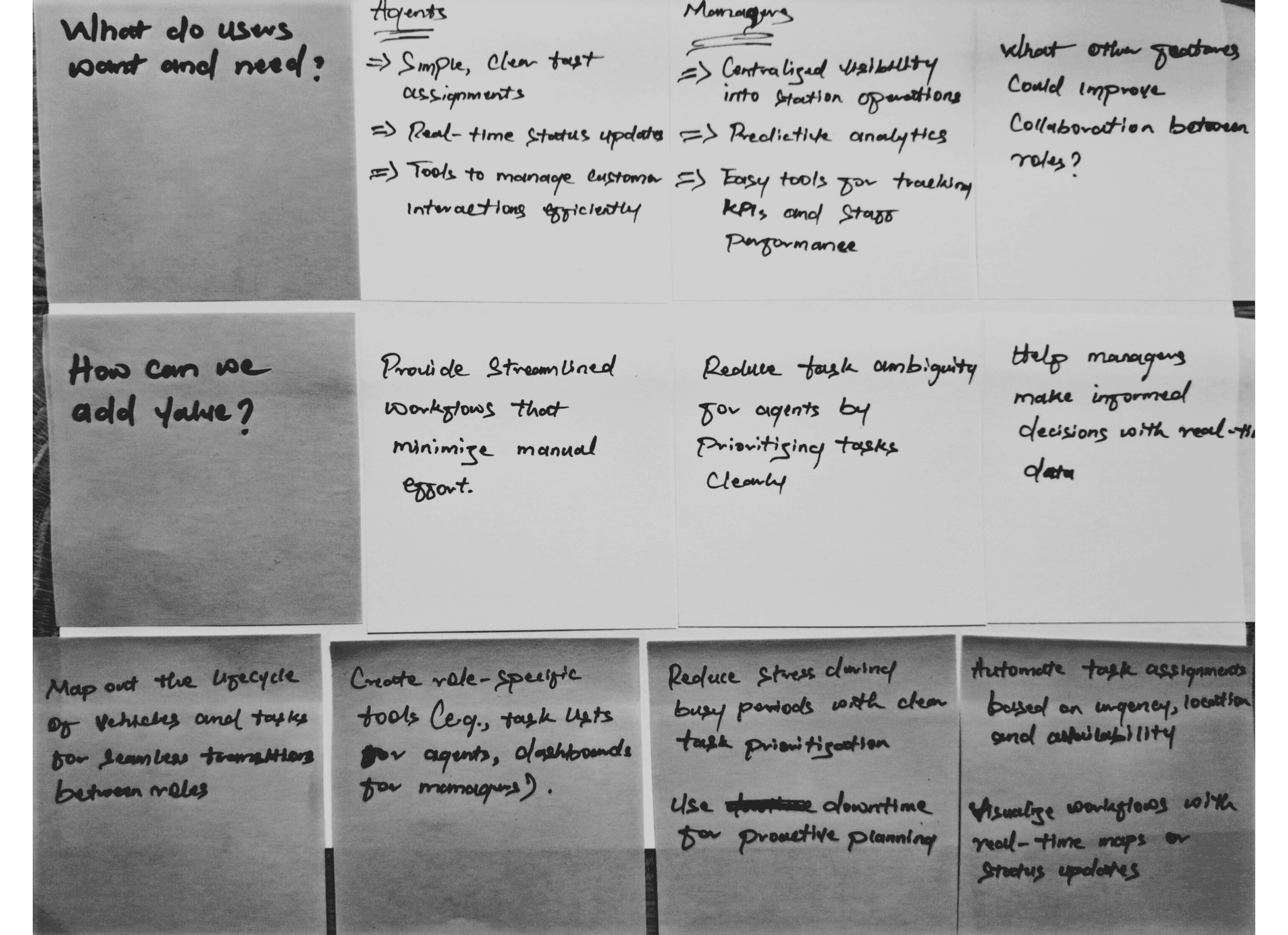
Immersion & Discovery
Immersion & Discovery
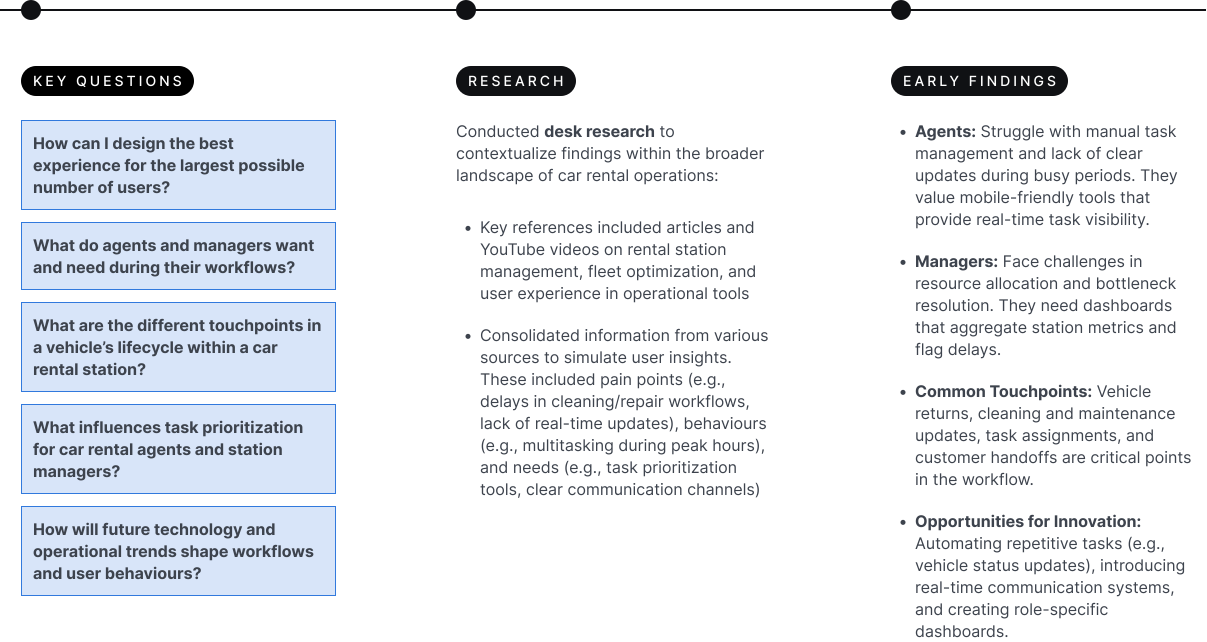
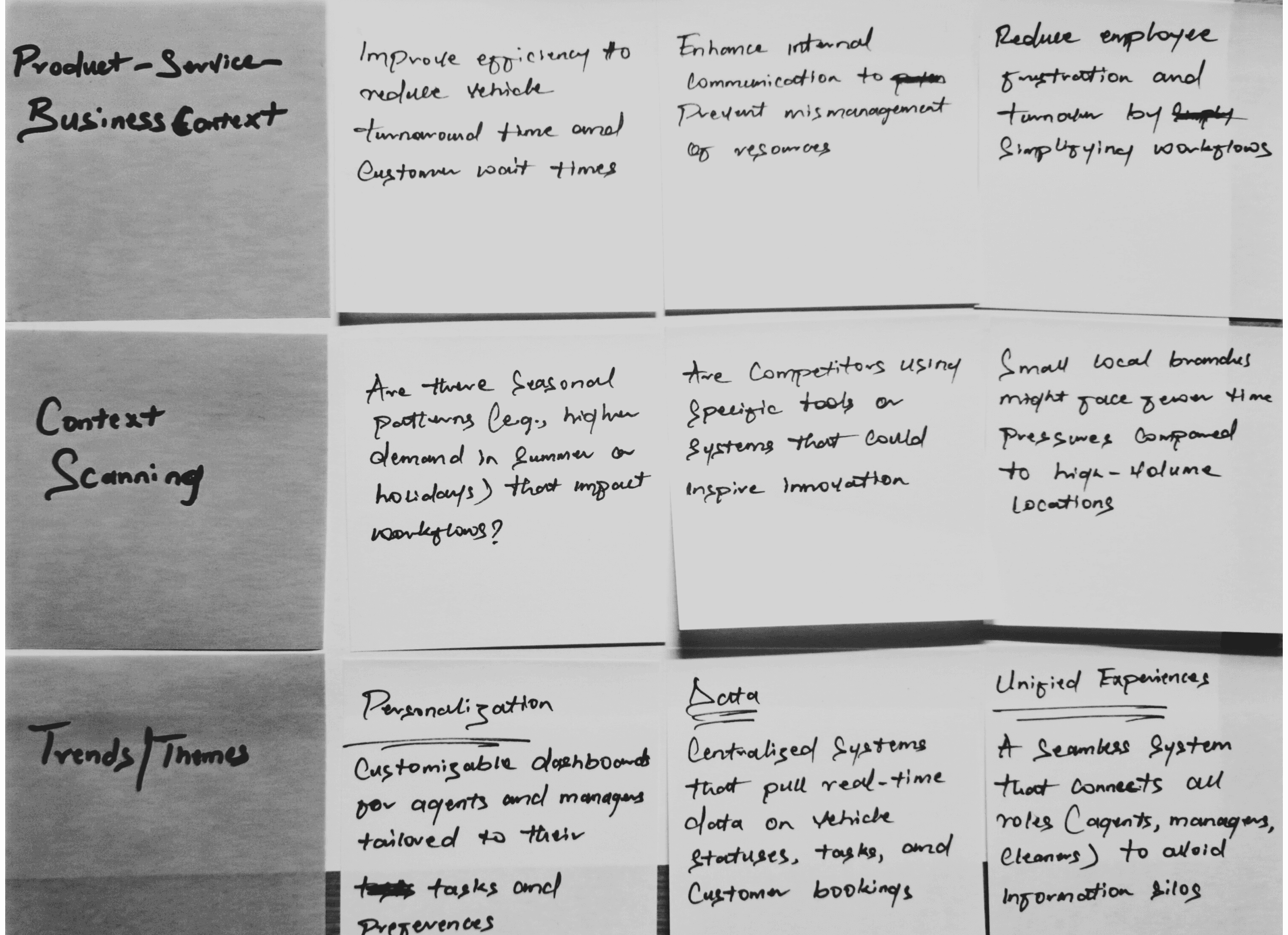
Synthesizing Insights
Synthesizing Insights
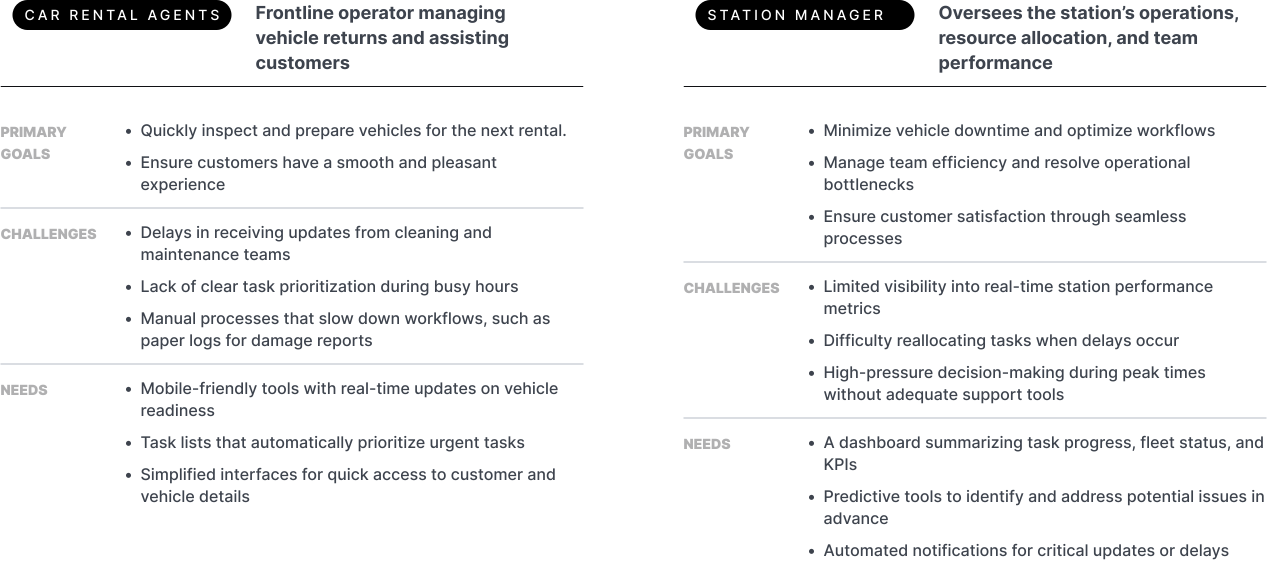
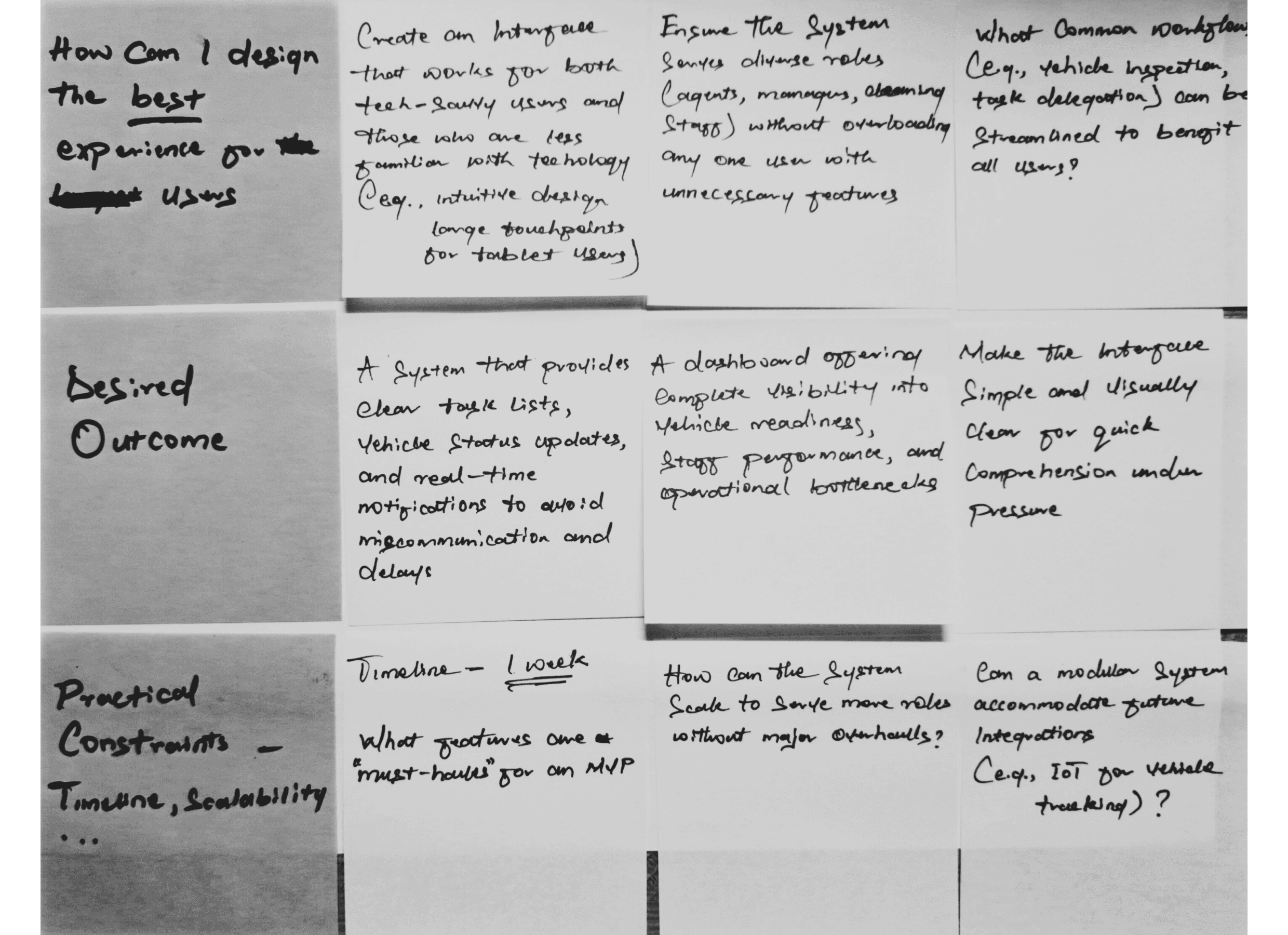
Opportunity Framing
Opportunity Framing
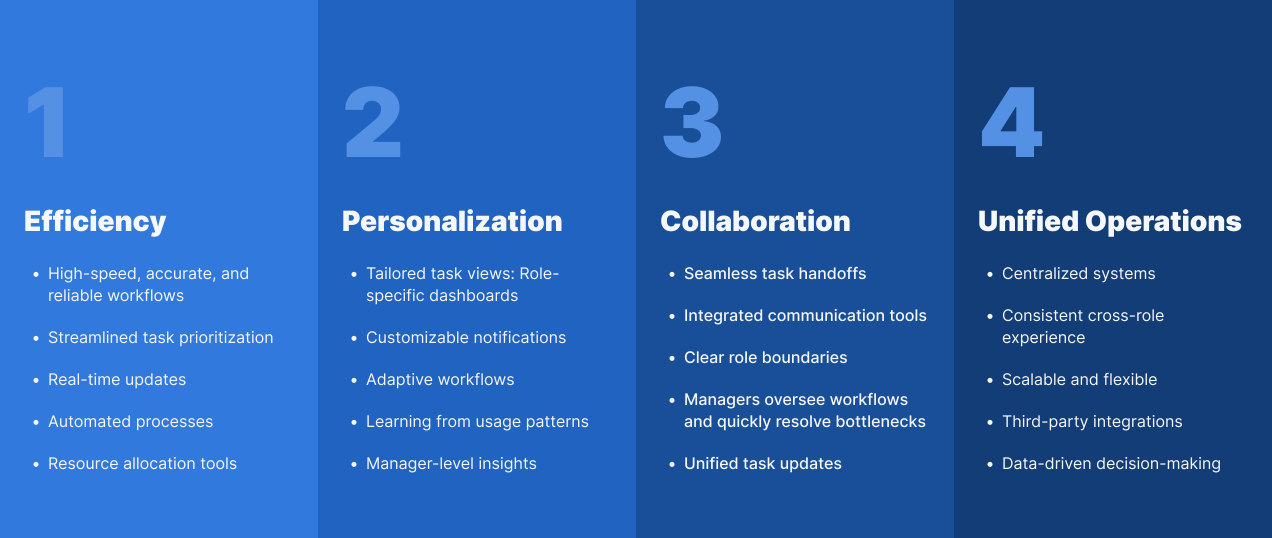
From research, I identified four opportunity areas across operational workflows, communication, and task management. These directly shaped the experience attributes and guided concept development — ensuring every design decision traces back to a validated user need.
From research, I identified four opportunity areas across operational workflows, communication, and task management. These directly shaped the experience attributes and guided concept development — ensuring every design decision traces back to a validated user need.
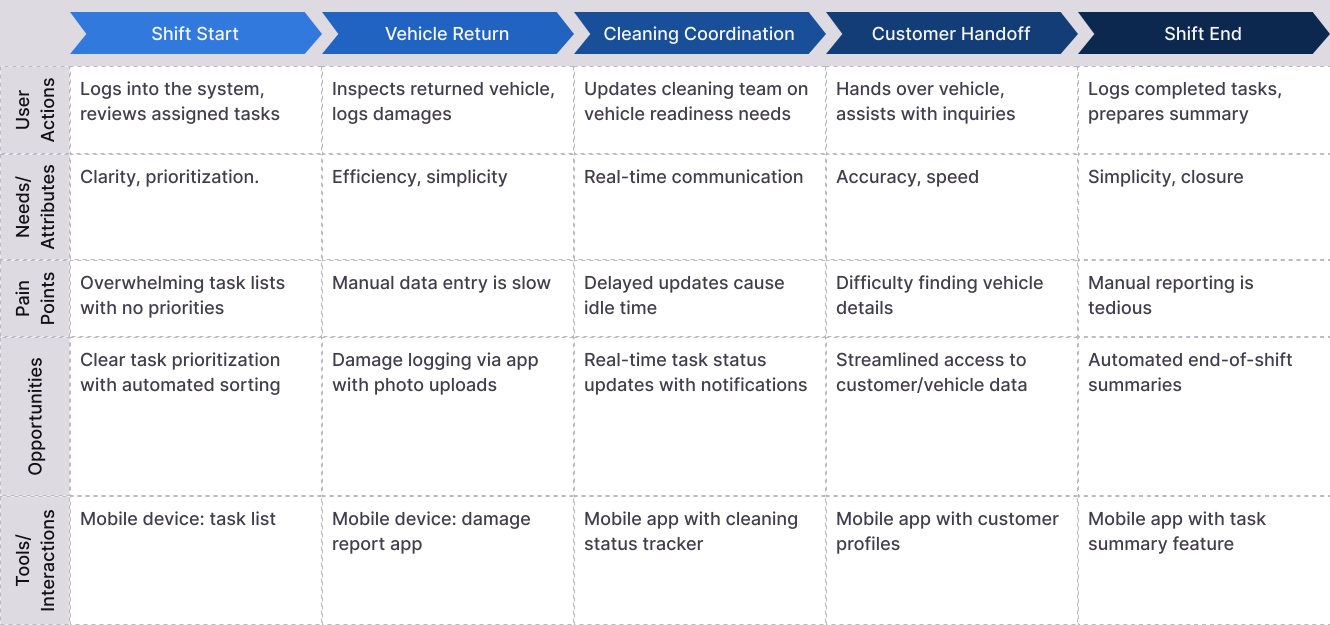
Journey Mapping: Car Rental Agents
Journey Mapping: Car Rental Agents
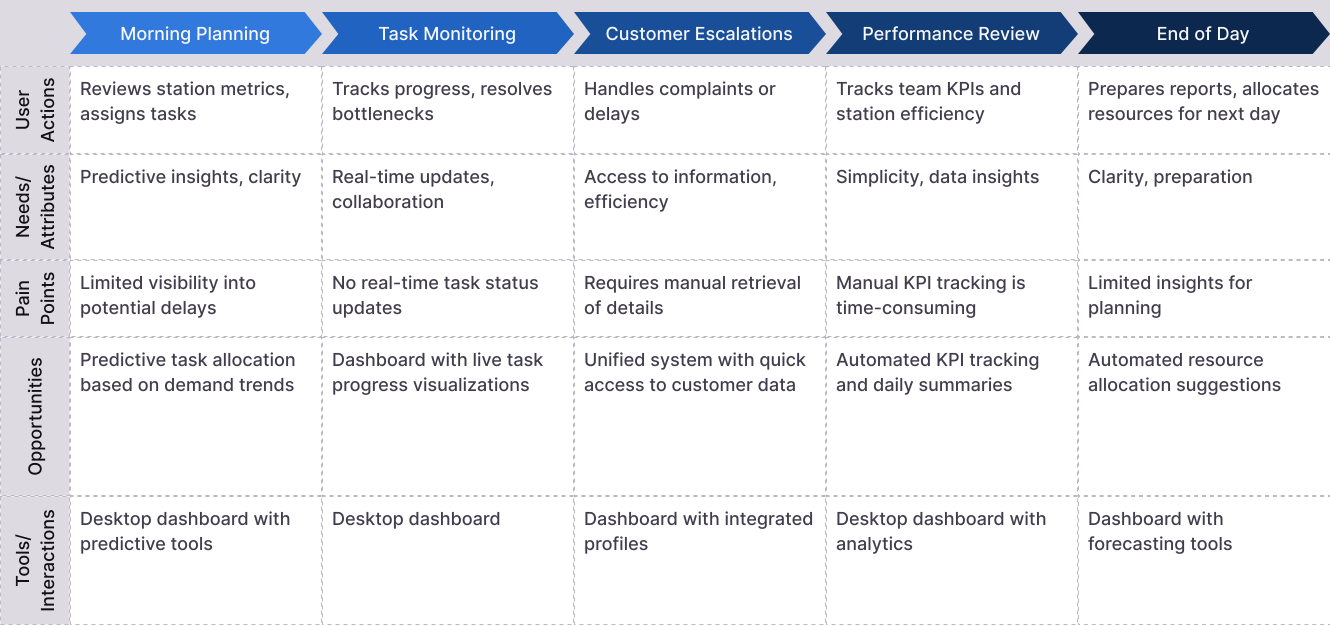
Journey Mapping: Store Manager
Journey Mapping: Store Manager
Concept Development
Concept Development
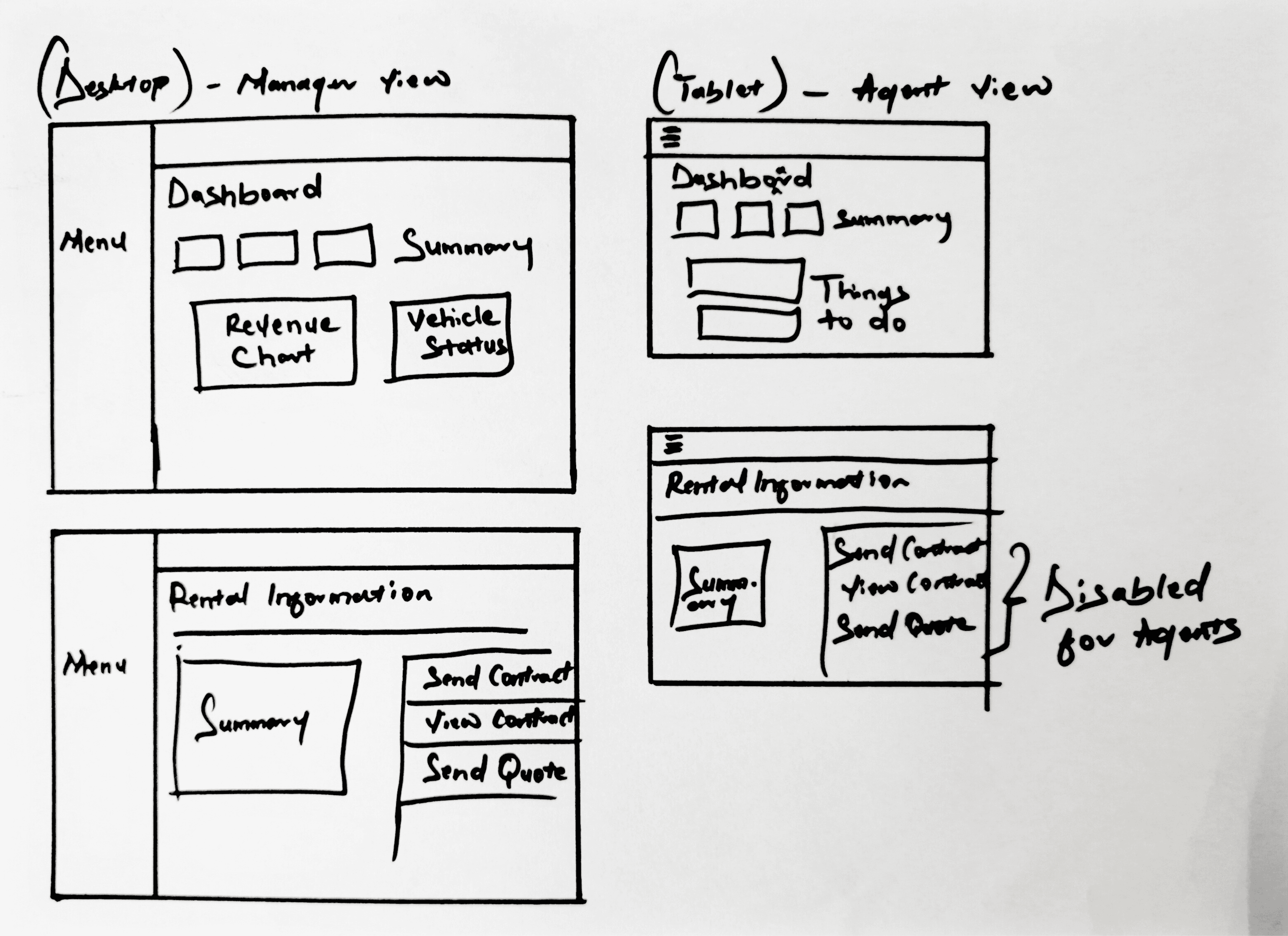
The core design decision: split the interface by role. Managers see revenue trends, fleet status, and administrative controls (contracts, quotes). Agents get a focused task list with disabled admin actions and contextual tooltips explaining restrictions. This separation eliminates ambiguity and ensures each user sees only what they need to act on.
The core design decision: split the interface by role. Managers see revenue trends, fleet status, and administrative controls (contracts, quotes). Agents get a focused task list with disabled admin actions and contextual tooltips explaining restrictions. This separation eliminates ambiguity and ensures each user sees only what they need to act on.
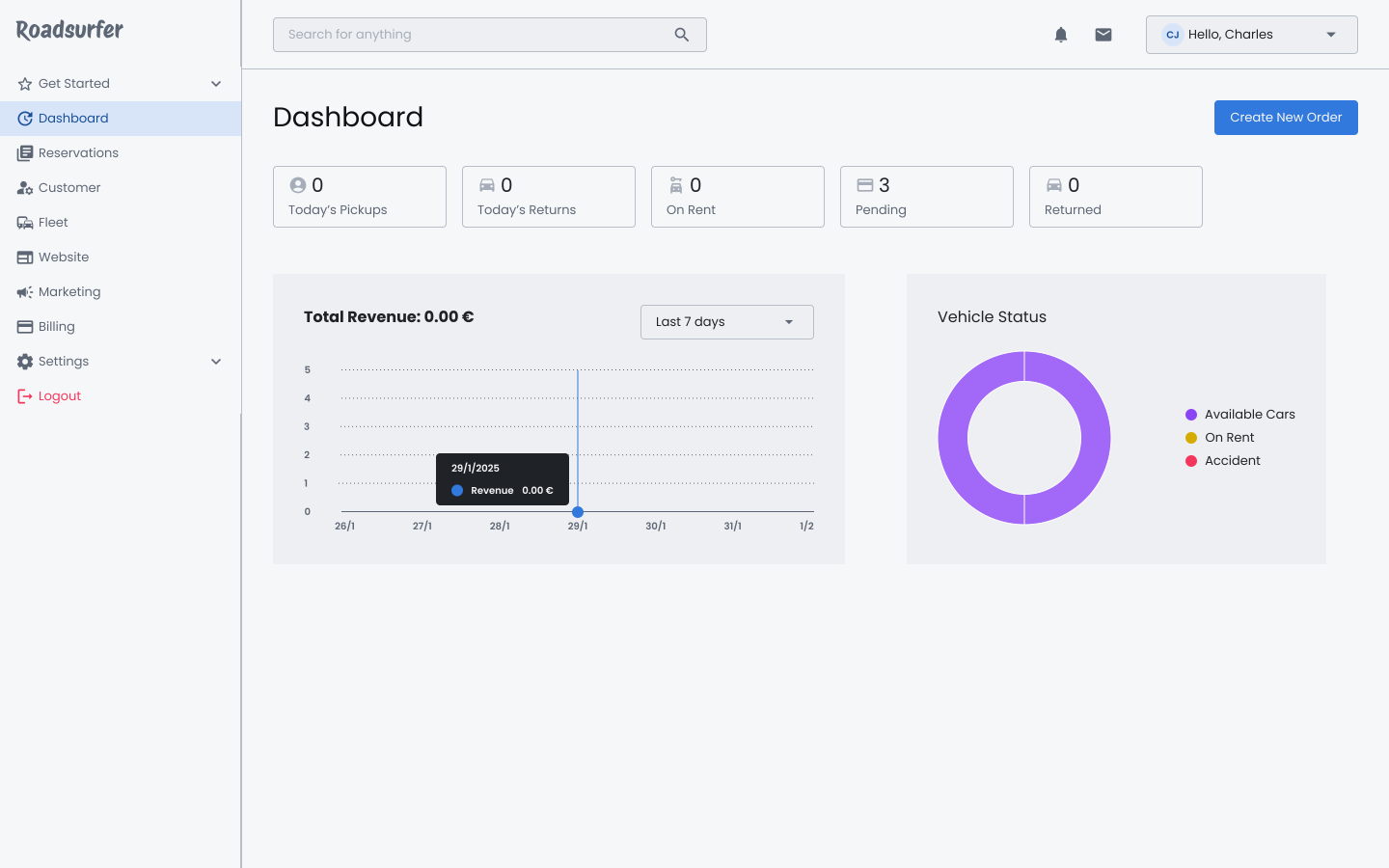
Dashboard (Manager view)
Dashboard (Manager view)
Managers get a high-level operational overview — revenue trends, fleet status, and administrative actions — designed for quick decision-making without drilling into individual tasks.
Managers get a high-level operational overview — revenue trends, fleet status, and administrative actions — designed for quick decision-making without drilling into individual tasks.
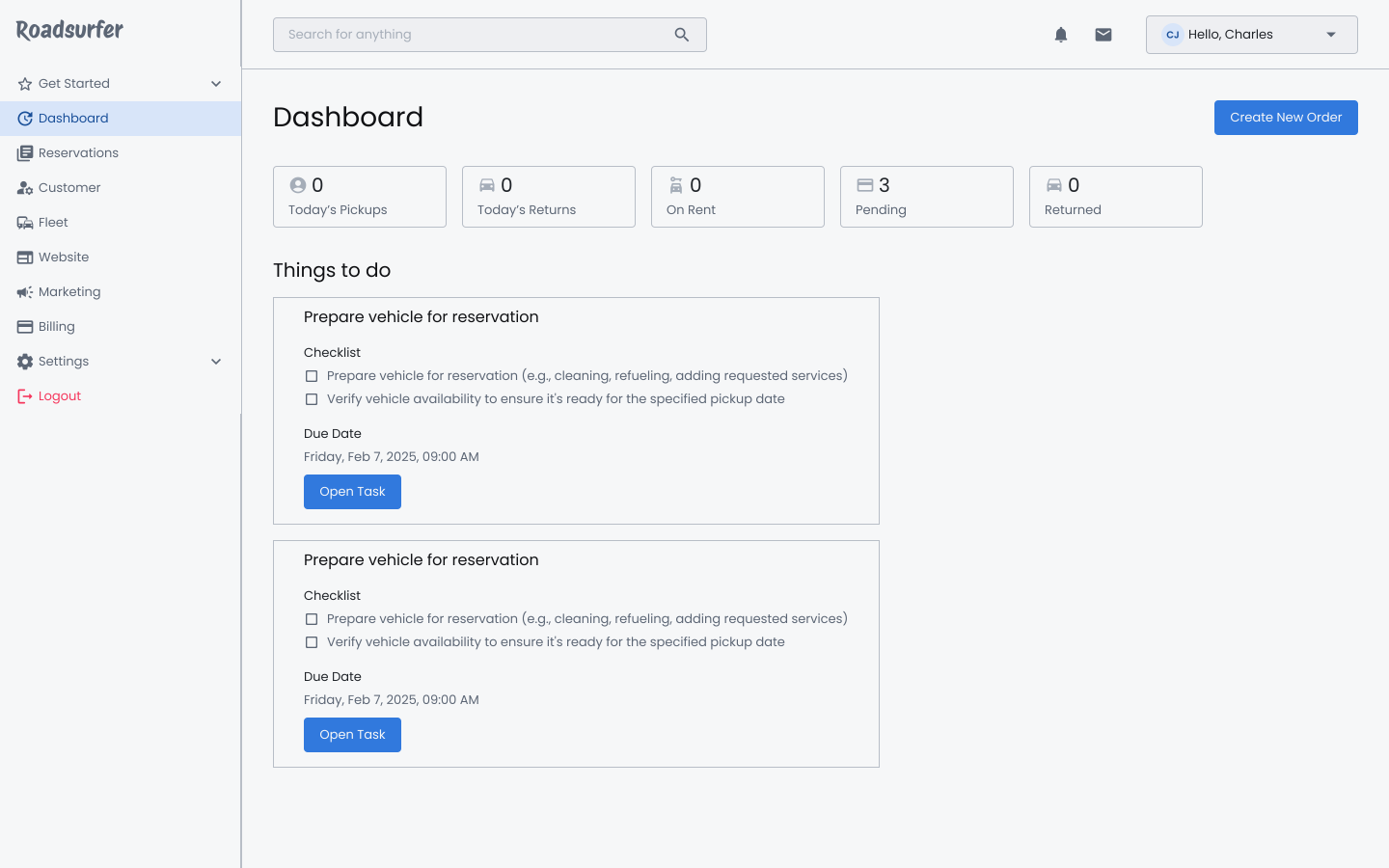
Dashboard (Agent view)
Dashboard (Agent view)
Agents see a scoped task list — immediate responsibilities front and centre, with admin actions disabled and tooltips explaining why. No clutter, no confusion.
Agents see a scoped task list — immediate responsibilities front and centre, with admin actions disabled and tooltips explaining why. No clutter, no confusion.
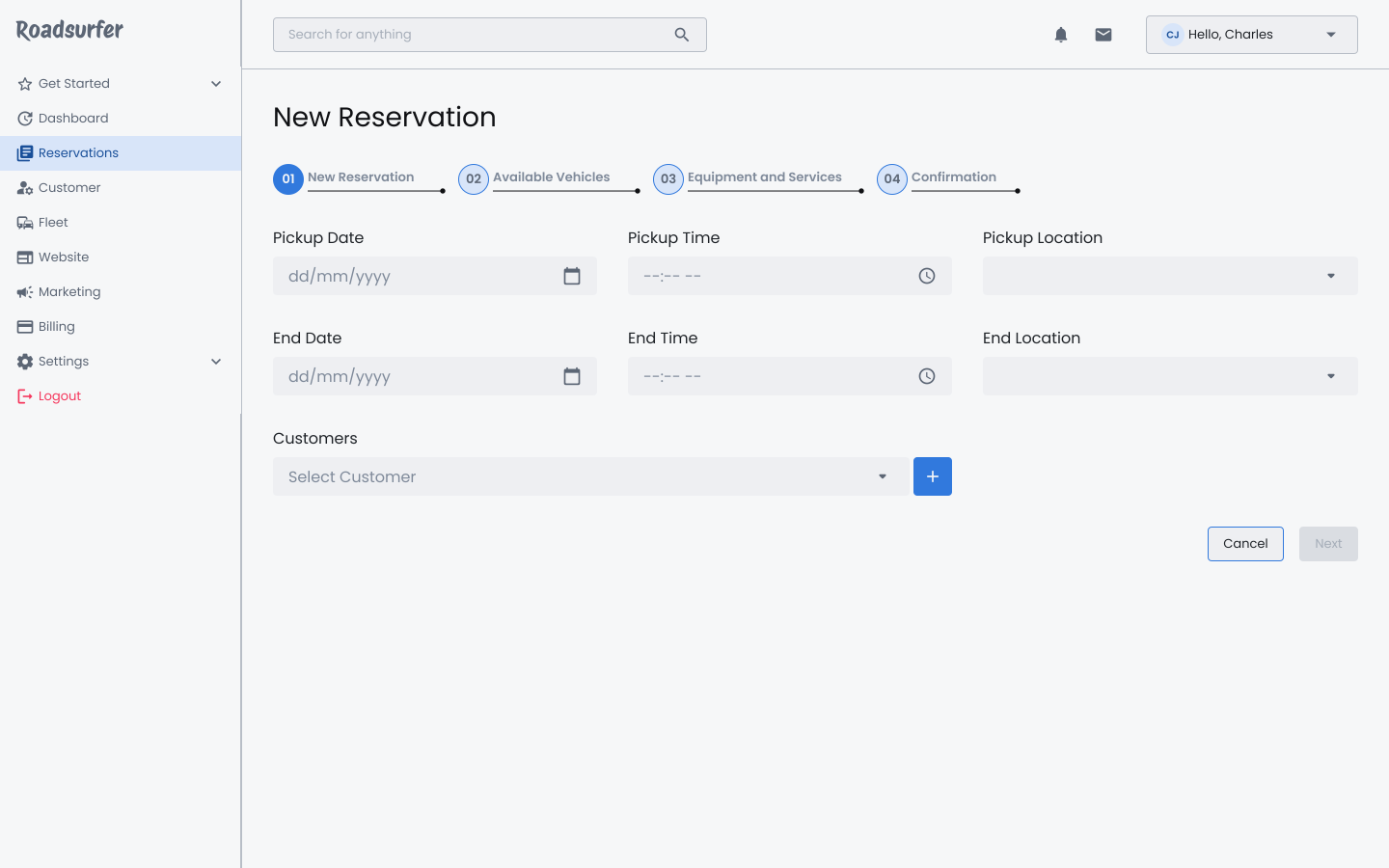
Creating a new reservation
Creating a new reservation
A step-by-step guided flow — vehicle selection, customer details, add-ons, and confirmation — designed to reduce errors and eliminate back-and-forth during peak hours.
A step-by-step guided flow — vehicle selection, customer details, add-ons, and confirmation — designed to reduce errors and eliminate back-and-forth during peak hours.
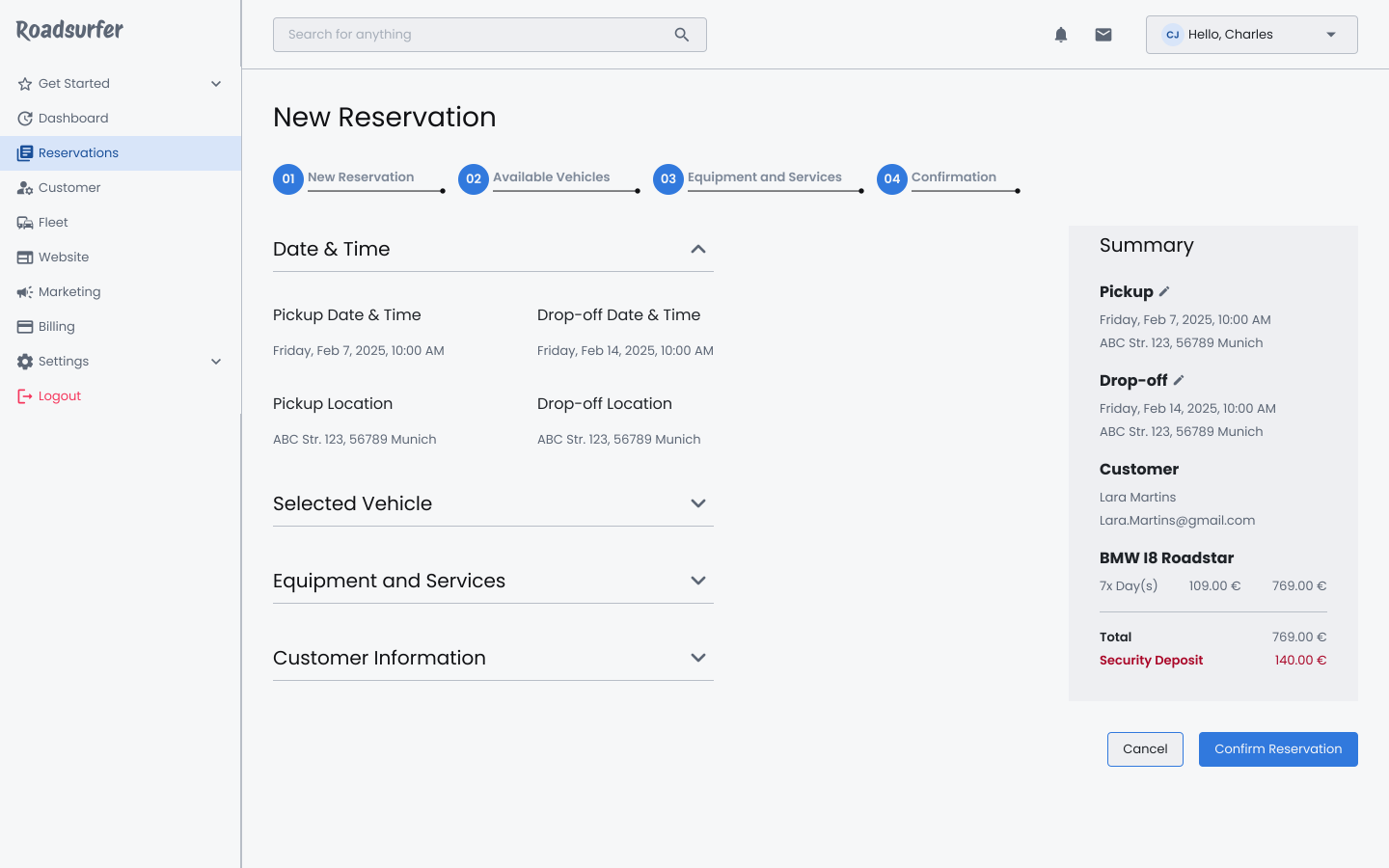
Confirming Reservation
Confirming Reservation
A review panel with clear billing breakdown — allowing agents to catch errors before committing. Every detail is editable up until final confirmation.
A review panel with clear billing breakdown — allowing agents to catch errors before committing. Every detail is editable up until final confirmation.
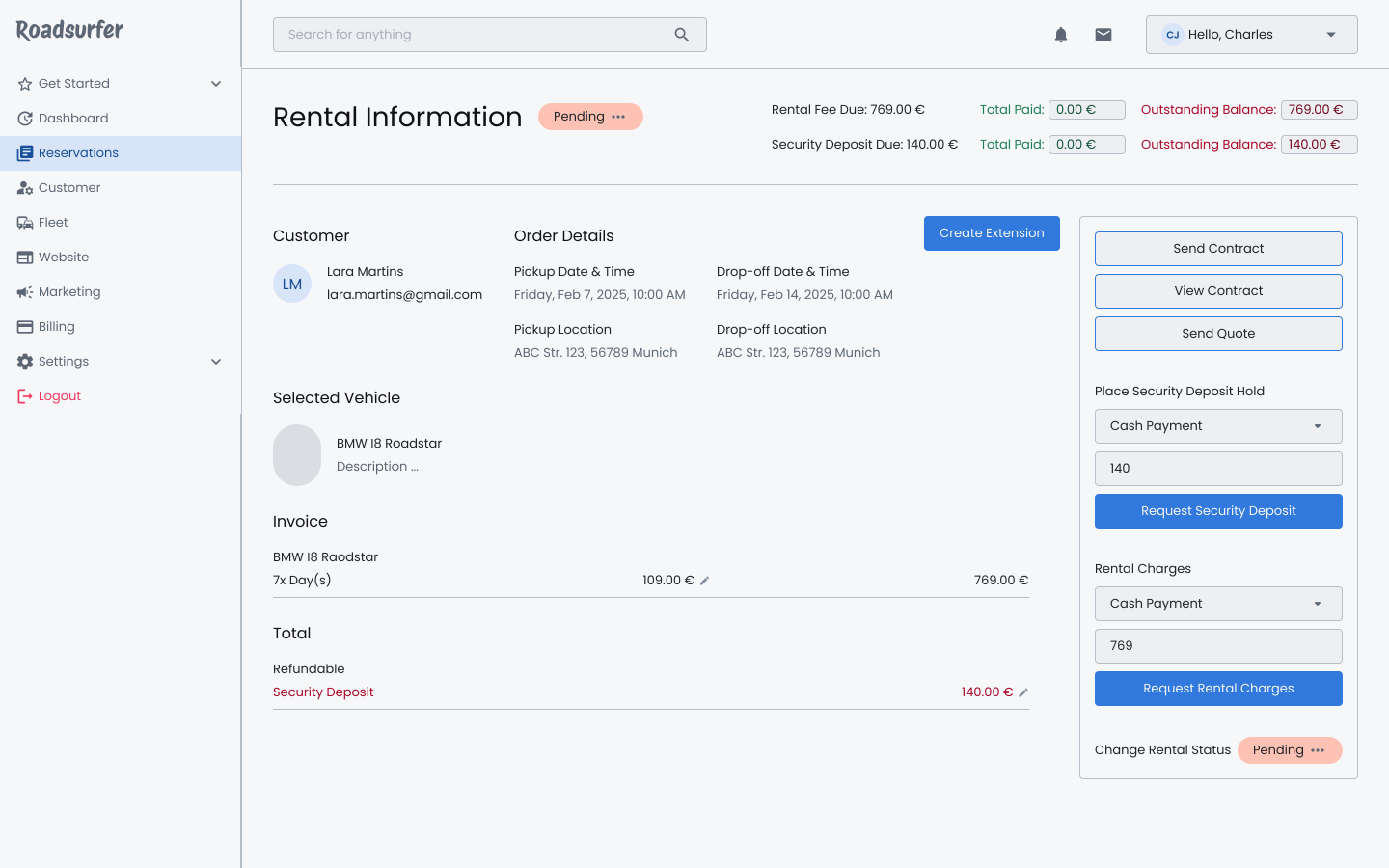
Rental Information (Manager rights)
Rental Information (Manager rights)
Full administrative access — managers can send contracts, generate quotes, and manage rental charges directly from the rental detail view.
Full administrative access — managers can send contracts, generate quotes, and manage rental charges directly from the rental detail view.
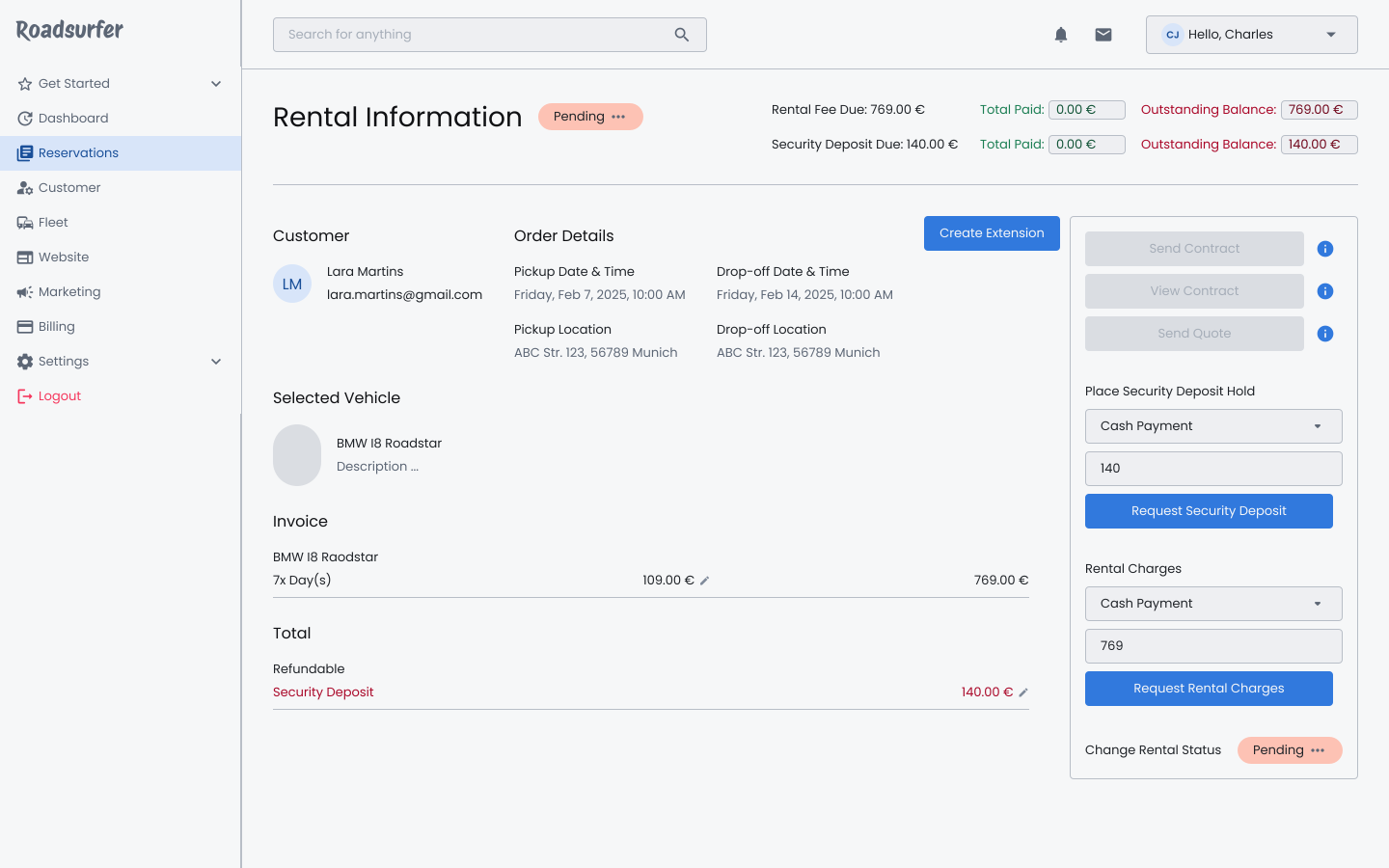
Rental Information (Agent rights)
Rental Information (Agent rights)
Agents see the same rental detail — but with admin actions disabled and contextual tooltips explaining restrictions. No ambiguity about what they can and can't do.
Agents see the same rental detail — but with admin actions disabled and contextual tooltips explaining restrictions. No ambiguity about what they can and can't do.
Validation Strategy
Validation Strategy
This concept is designed to be testable — not final. The next step would be stakeholder alignment, followed by moderated testing with real agents and managers to validate assumptions, surface blind spots, and prioritise what ships first.
This concept is designed to be testable — not final. The next step would be stakeholder alignment, followed by moderated testing with real agents and managers to validate assumptions, surface blind spots, and prioritise what ships first.
Objectives
Objectives
Validate ease of use for both agent and manager dashboards. Assess whether users can complete core tasks efficiently and accurately. Confirm the design aligns with user needs — clear task prioritisation, role-specific functionality, and immediate status visibility.
Validate ease of use for both agent and manager dashboards. Assess whether users can complete core tasks efficiently and accurately. Confirm the design aligns with user needs — clear task prioritisation, role-specific functionality, and immediate status visibility.
Method
Method
Moderated usability testing with think-aloud protocol — observing real agents and managers performing assigned tasks to surface friction, confusion, and workflow gaps before engineering commitment.
Moderated usability testing with think-aloud protocol — observing real agents and managers performing assigned tasks to surface friction, confusion, and workflow gaps before engineering commitment.
Metrics
Metrics
Quantitative: Task completion rate, time on task, error rate
Qualitative: Satisfaction scores, perceived ease of use
Expected Results
Expected Results
For agents: Reduced task ambiguity, faster task completion, and improved satisfaction with the simplified interface.
For managers: Enhanced decision-making, streamlined task delegation, and clear visibility of station performance.
Challenge
To design a dashboard and task management system for agents and managers, enabling real-time vehicle status updates, seamless task delegation, and improved communication.
Results
A role-specific system that streamlines workflows, automates repetitive processes, and enhances collaboration through real-time updates and predictive insights. The product directly addresses pain points uncovered during research, delivering efficiency and simplicity.
Duration
1 week
My Role/activities
Desk research; user needs synthesis; journey mapping; concept development; UX and UI design
Company
roadsurfer (Conceptual project)
Introduction
Immersion & Discovery
Synthesizing Insights
Concept Development
The design concept prioritizes role-specific functionality and clarity for managers and agents within the car rental management system.
The manager view (desktop) is structured to provide access to critical operational metrics such as revenue trends and fleet status, as well as administrative actions like sending or viewing contracts and quotes.
In contrast, the agent view (tablet) focuses on task execution, with a simplified "Things to Do" list and disabled administrative controls, accompanied by tooltips for clarity on role restrictions.
This distinction ensures streamlined workflows tailored to each role, improving efficiency while maintaining system coherence.
Opportunity Framing
Based on research, I defined four opportunity areas to enhance the experience of agents and managers. These areas consider operational workflows, communication, and task management, guiding ideation and concept development. These opportunities will shape experience attributes.
Journey Mapping: Car Rental Agents
Journey Mapping: Store Manager
Dashboard (Manager view)
The Dashboard (Manager View) provides managers with an overview of key operational metrics
Dashboard (Agent view)
The Dashboard (Agent View) focuses on actionable tasks for agents. It highlights "Things to do," presenting a checklist of immediate responsibilities
Creating a new reservation
This is a step-by-step workflow guiding users through the reservation process to ensure accuracy and efficiency
Confirming Reservation
Users can review information about the reservation and make any necessary modifications. A summary panel provides clear, concise billing details, ensuring all reservations are accurate before confirmation
Rental Information (Manager rights)
Managers can send or view contracts, generate quotes, and manage rental charges
Rental Information (Agent rights)
Streamlined for agents, focusing on their specific responsibilities. Certain actions, such as sending contracts or viewing quotes, are disabled with tooltips explaining the restricted access
This is an early concept, therefore, I would usually use this as a base for discussion with team members and stakeholders. After which we can figure out what features should be prioritized, what is missing in my concept, what works, what doesn’t, what can be improved, emotional responses and actionable steps.
That said, I will build on this concept then test and iterate.
Objectives
Validate the ease of use for both agents and manager dashboards
Access whether users can achieve their tasks efficiently and accurately
Confirm that the design aligns with user needs, such as clear task prioritization, role-specific functionality, and immediate status visibility
Method
The method I will use will depend on various factors, but for a task like this a moderated testing, where I get to ask users to think aloud while performing assigned tasks would be highly beneficial
Metrics
Quantitative:
Task Completion Rate
Time on Task
Error Rate
Quantitative:
Satisfaction Scores
Ease of Use
Expected Results
For Agents: Reduced task ambiguity, faster task completion, and improved satisfaction with the simplified interface
For Managers: Enhanced decision-making, streamlined task delegation, and clear visibility of station performance
Validating the concept
Next Case Study
How I turned thousands of airline surveys into a dashboard that surfaces actionable insights in under 5 minutes.
Say hello