Passenger Sentiment Intelligence: Turning Survey Noise into Actionable Airline Strategy
Passenger Sentiment Intelligence: Turning Survey Noise into Actionable Airline Strategy
Empowering airline teams to uncover passenger sentiment trends and drive smarter decisions with clarity and speed
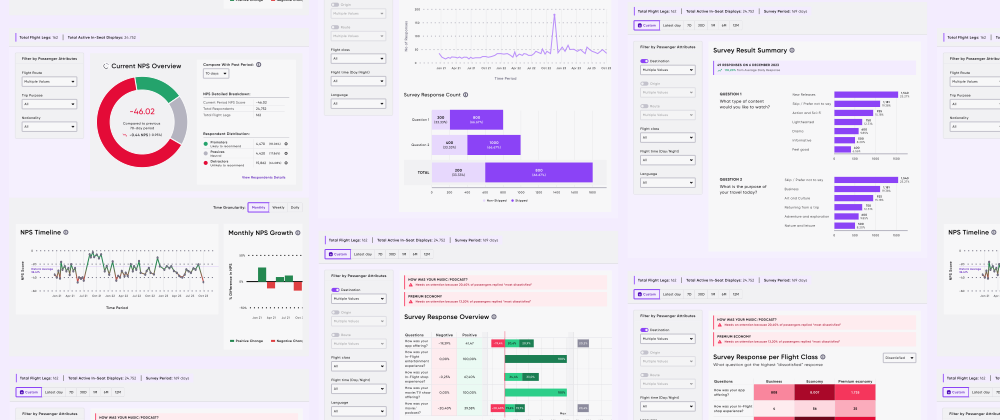
To comply with NDA, I have omitted and obfuscated confidential information. All information here is my own and does not reflect the views of the company.
Project Overview
AERENA is AERQ's modular platform for transforming the in-flight experience: digital engagement, fleet operations, and data intelligence for airlines worldwide. I led UX design for the Analytics module, a dashboard product that turns raw passenger sentiment data into strategic decisions. The users (airline ops managers, CX analysts, and marketing leads) needed to move from "we have survey data" to "we know exactly what to fix and where" in under five minutes.
Timeline
3 months (Discovery to Shipped)
My Role
Lead UX Designer (sole designer on the module)
Scope
Research, information architecture, wireframing, component system, high-fidelity UI, interaction design, data visualisation strategy
Team
Data Analyst; Data Engineer; Product Owner
Problem & Design Goals
Airlines collect thousands of passenger surveys across flights, cabin classes, and routes, but the data sits in spreadsheets and slide decks. No one can answer "why did NPS drop on Dubai-London Economy last quarter?" without hours of manual analysis.
Passenger sentiment trends
How might we help airline teams quickly understand passenger sentiment trends?
Flexible segmentation
How might we enable flexible segmentation by flight class, nationality, or trip purpose?
Make complex data intuitive
How might we present complex data in an intuitive, non-technical format?
Design Goals
Prioritise clarity, actionability, and usability across all three user types. Create a modular, scalable dashboard that works for both quick health checks and deep investigation. Reduce cognitive load while preserving the analytical depth that power users demand.
Research & Analysis
Through domain research and stakeholder interviews, three critical user pain points emerged:
Better understanding of NPS drops
Difficulty correlating NPS drops with specific routes, classes, or trip types.
Consistent data interpretation
Fragmented tools causing inconsistent data interpretation.
Deeper investigation and quick grasp
Demand for fast, at-a-glance health checks and deeper investigative capabilities.
Three primary personas drove every design decision: the Airline Ops Manager (needs fleet-wide health checks in 30 seconds), the CX Analyst (needs to drill into route-specific sentiment data), and the Marketing Lead (needs campaign-relevant satisfaction trends by passenger segment).
Design Process
Information Architecture
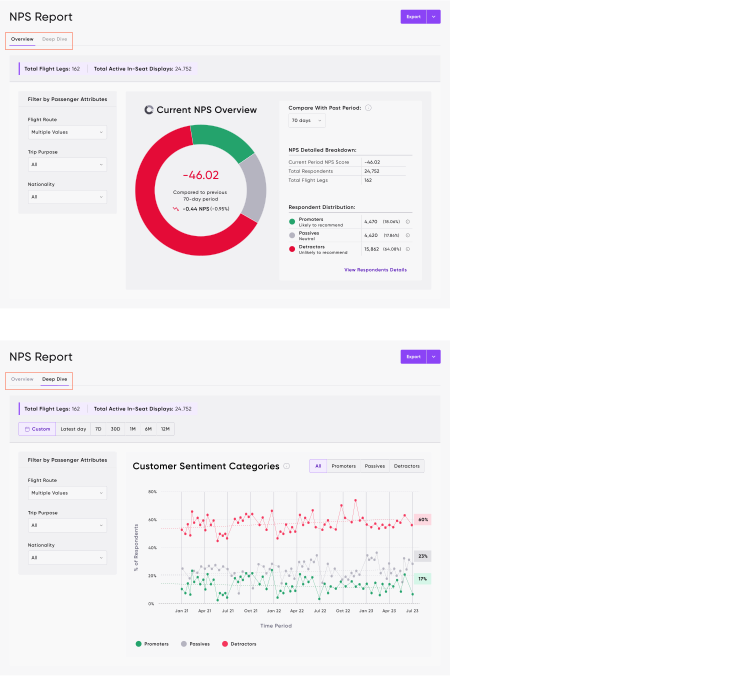
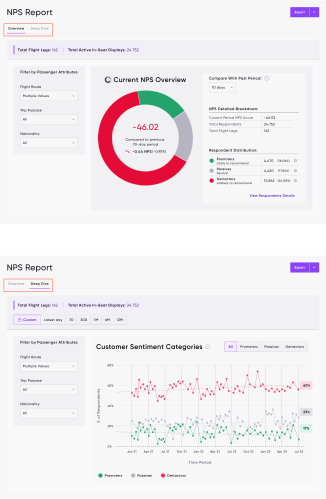
The Analytics experience was divided into two distinct layers. Overview: high-level KPIs, current NPS scores, and quick trends, designed for the "30-second scan" use case. Deep Dive: sentiment breakdowns, per-class analysis, and detailed survey feedback, for when stakeholders need to investigate a specific anomaly.
Overview
Deep Dive
Overview
Deep Dive
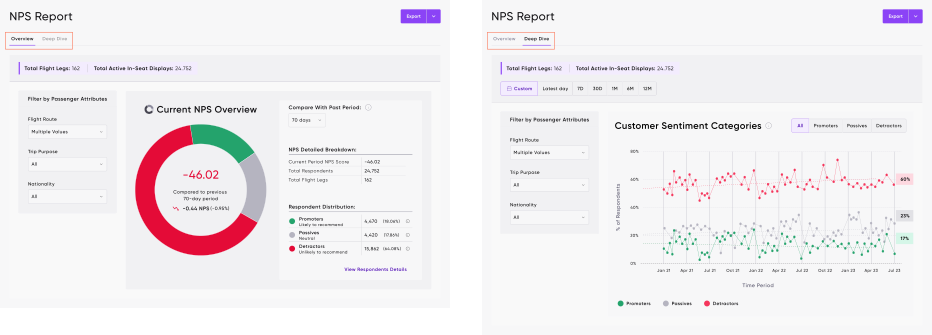
Wireframes & Interaction Models
Wireframes prioritised modular card layouts, progressive filter chains, and contextual drill-downs. The key design challenge: making global filters (affecting the entire page) and local filters (scoped to a single chart) visually distinct without adding friction.
Component Design
I built a reusable component system: filter panels, NPS donut visualisations, sentiment trend graphs, survey breakdown cards, and heatmap modules. Each component was designed to work at multiple scales, from a compact KPI card in the overview to a full-width analytical view in the deep dive.
Data Visualisation Decisions
Donut charts for NPS summaries and comparative deltas, giving an instant "are we up or down?" signal. Stacked bar charts for class segmentation of sentiment categories. Trend lines and growth bars for historical NPS performance over time. Heatmaps for detailed survey response distributions across touchpoints.
The Shipped Product
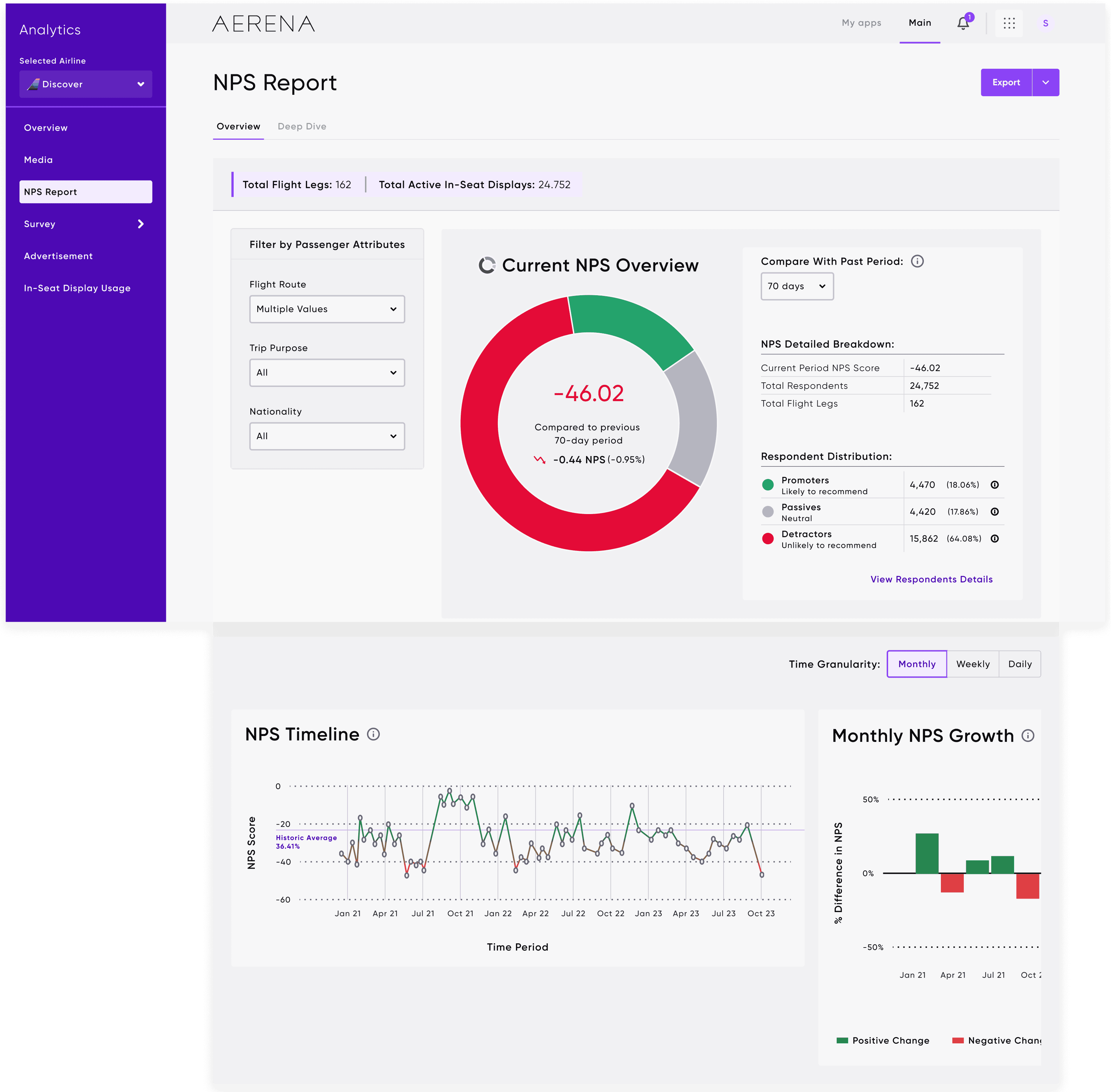
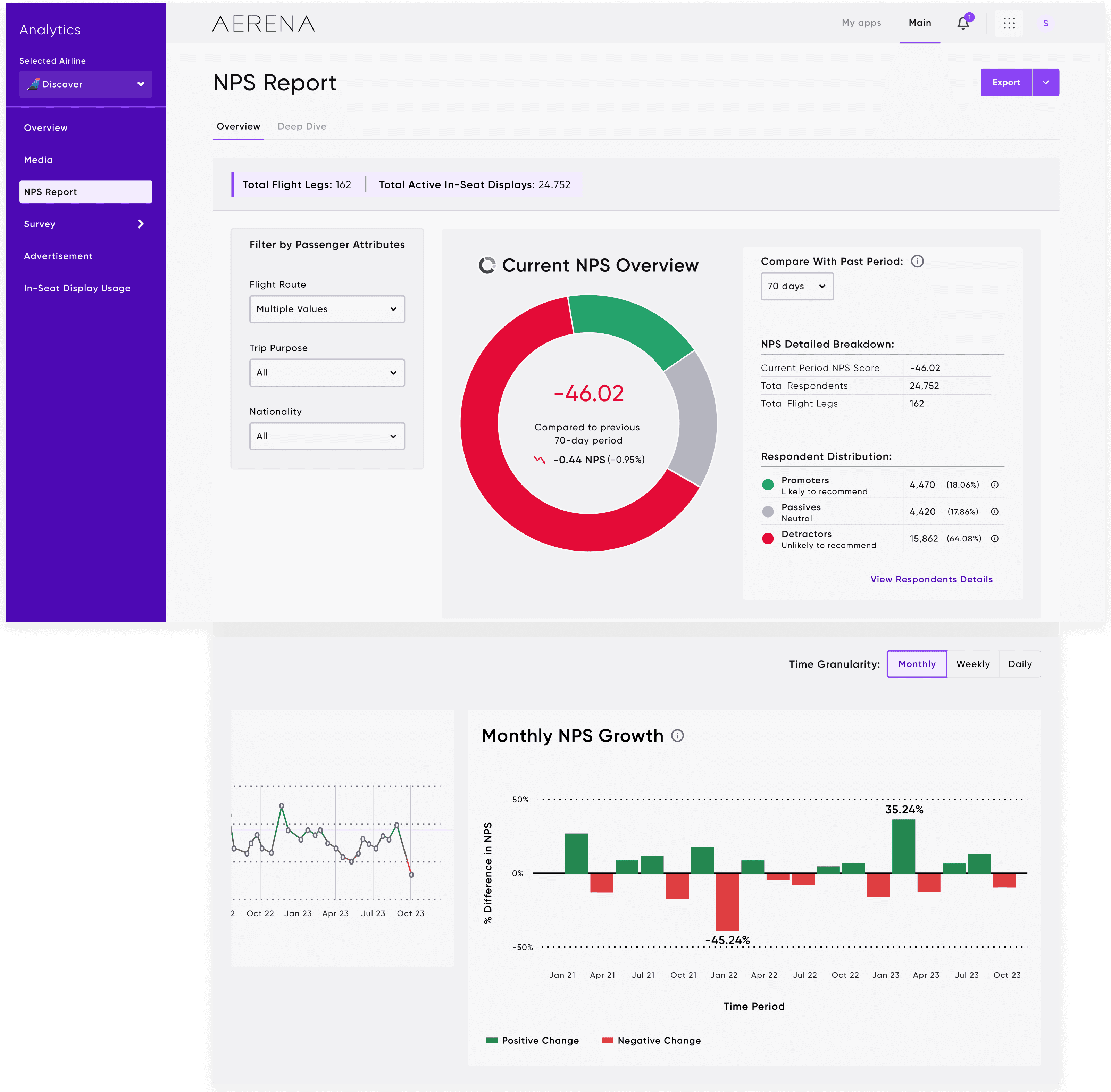
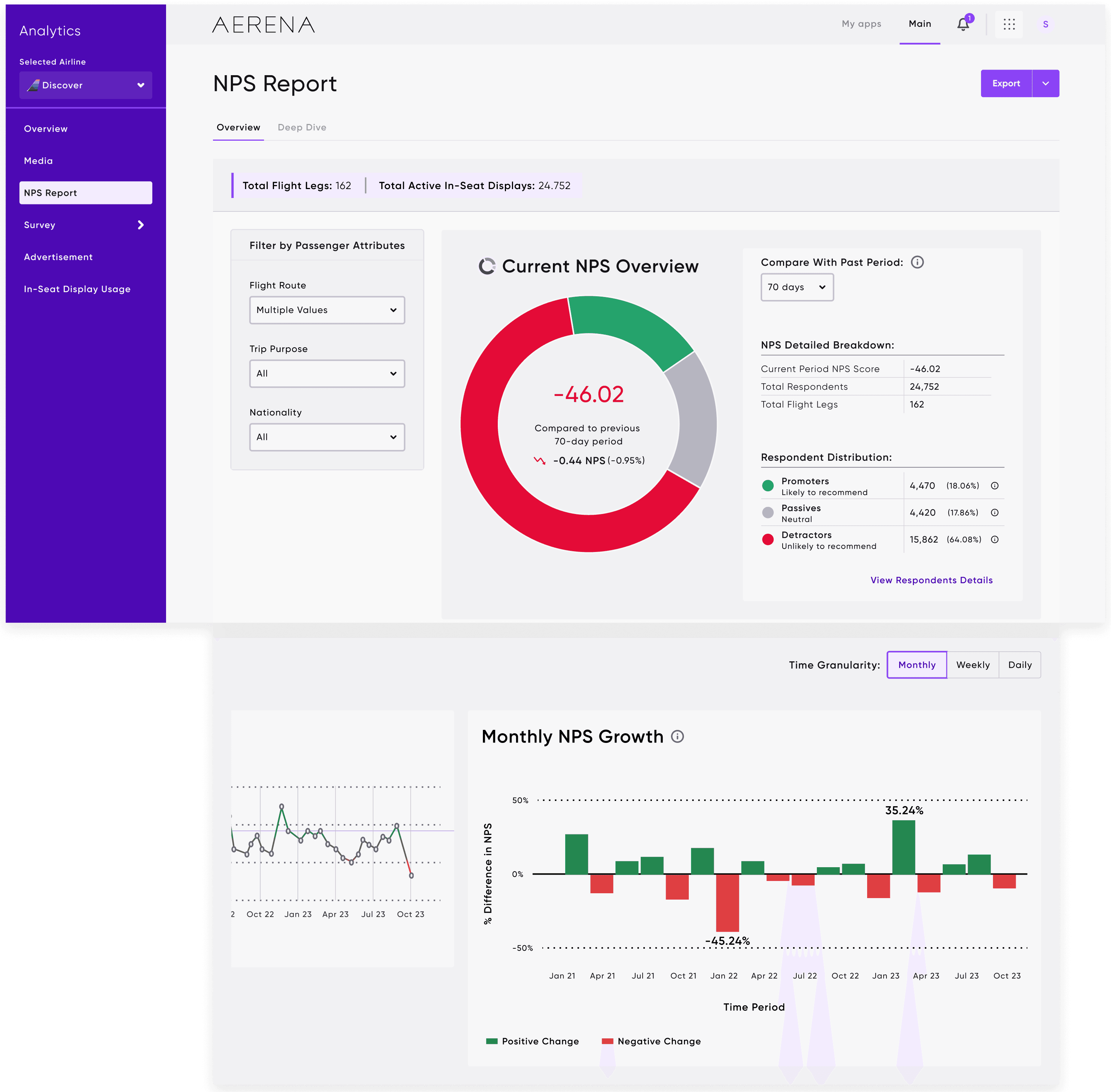
NPS Report: Overview
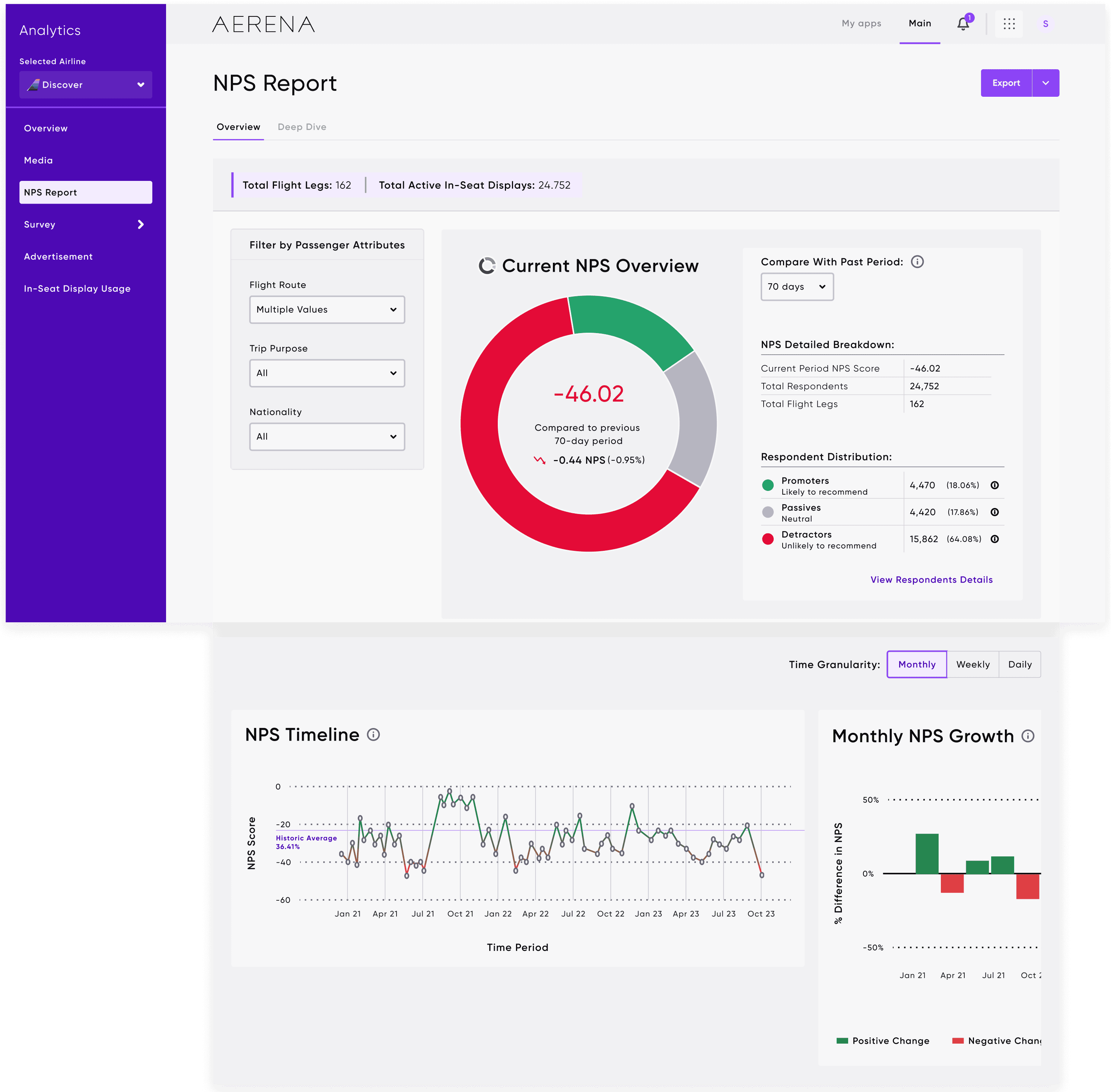
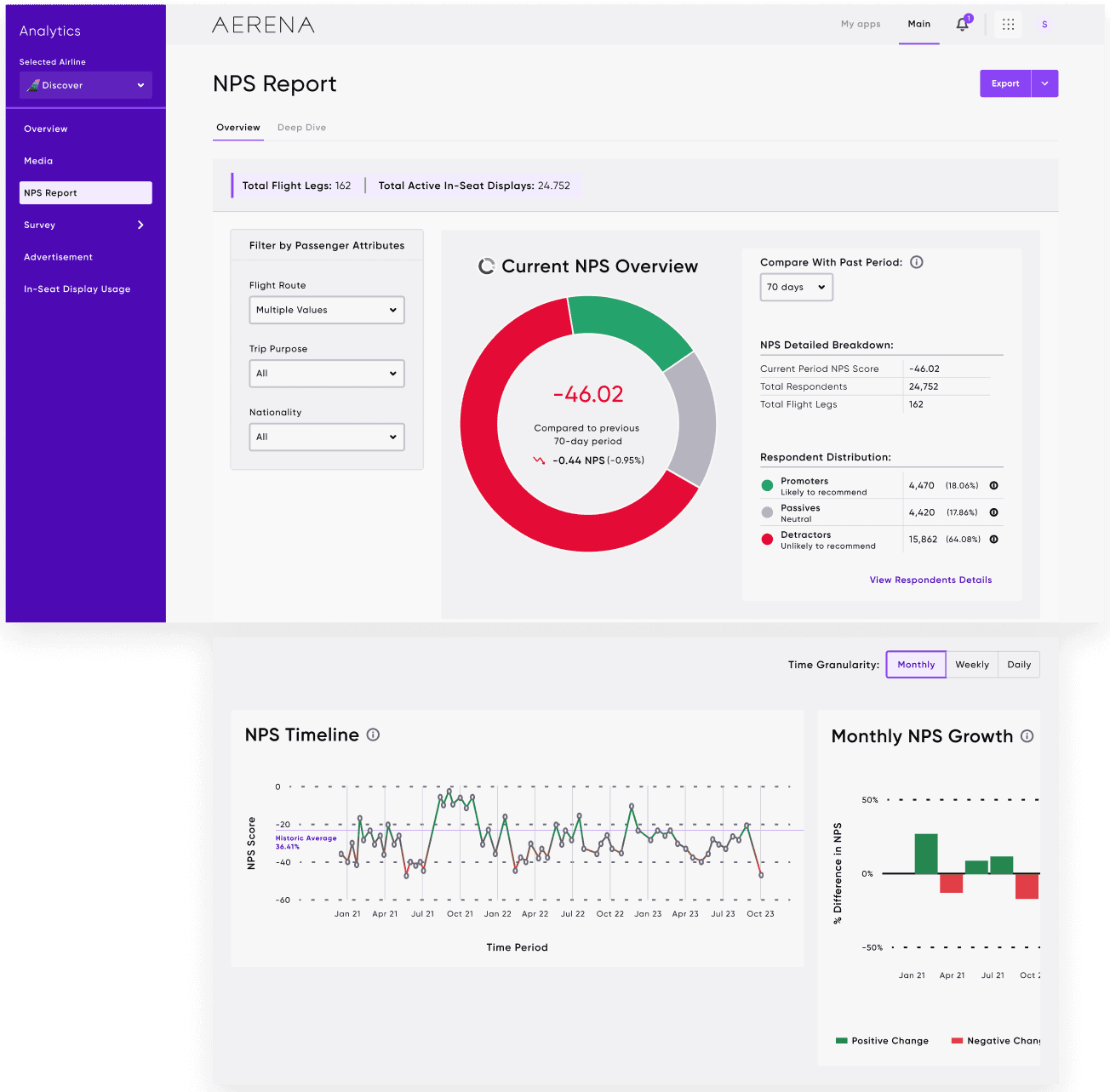
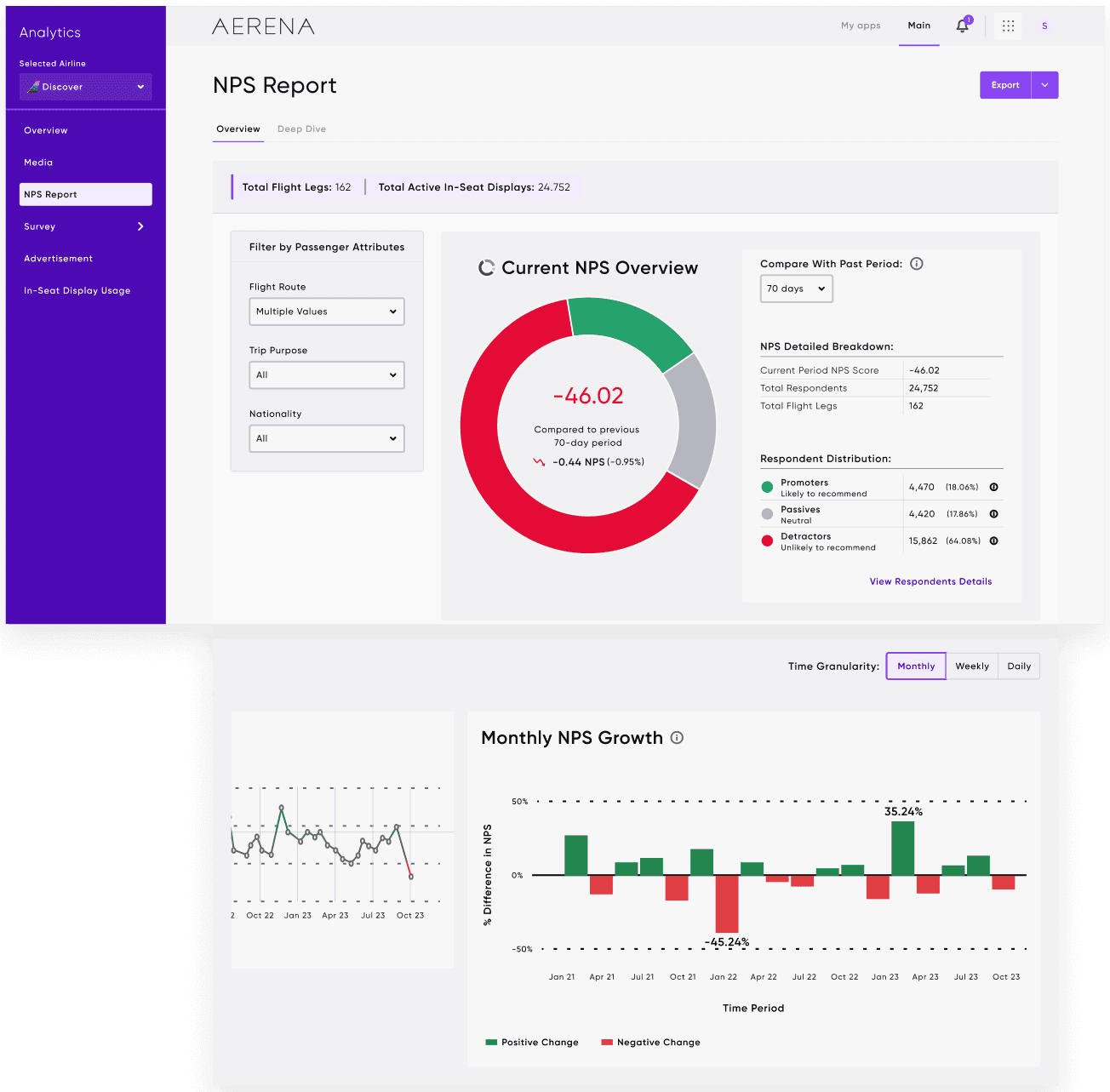
Donut visual summarising current NPS with past-period comparison. One glance tells the story. Flight route, trip purpose, and nationality filters clearly scoped at the top. Timeline and growth views enabling granular exploration without losing context.
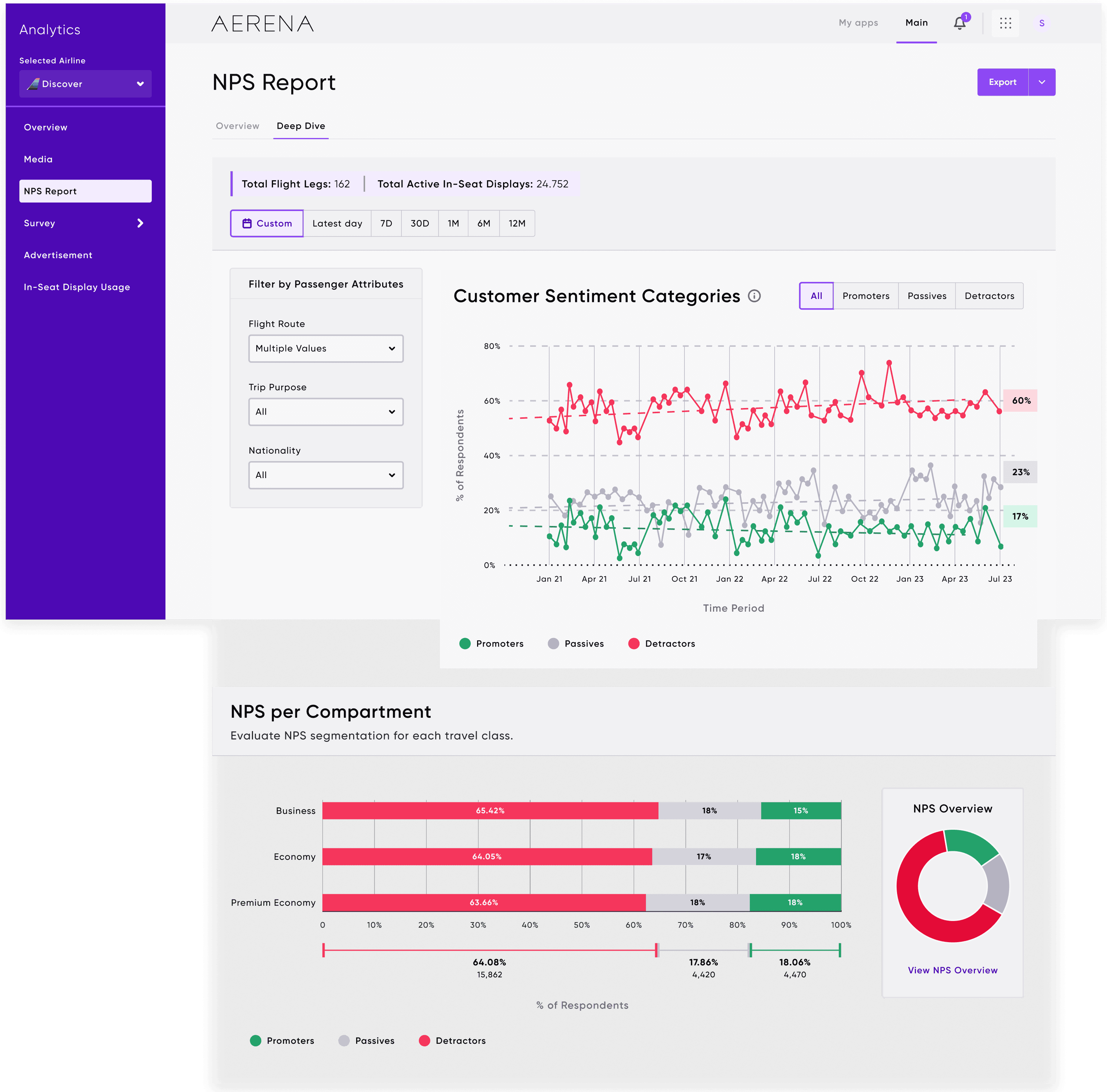
NPS Report: Deep Dive
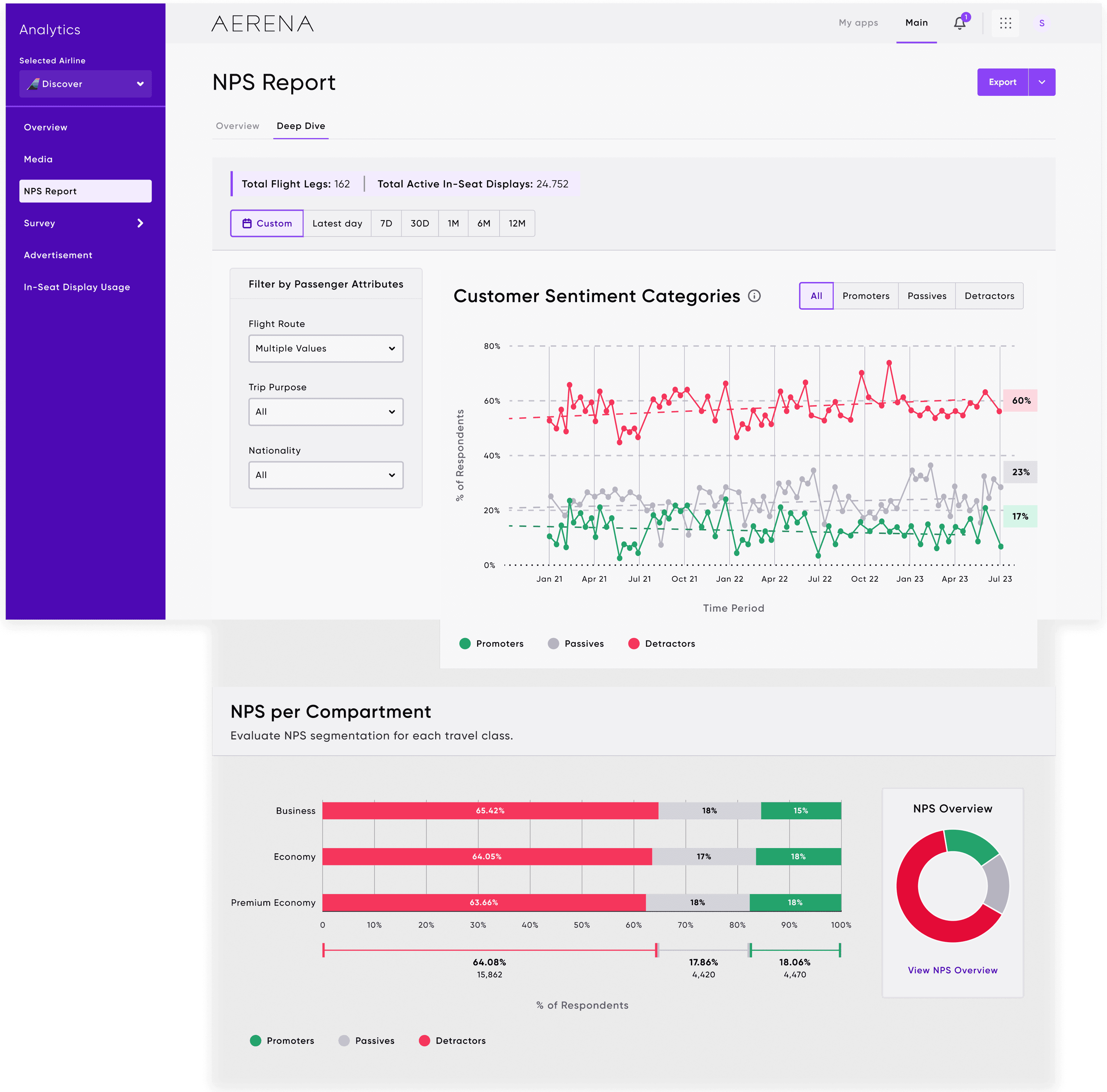
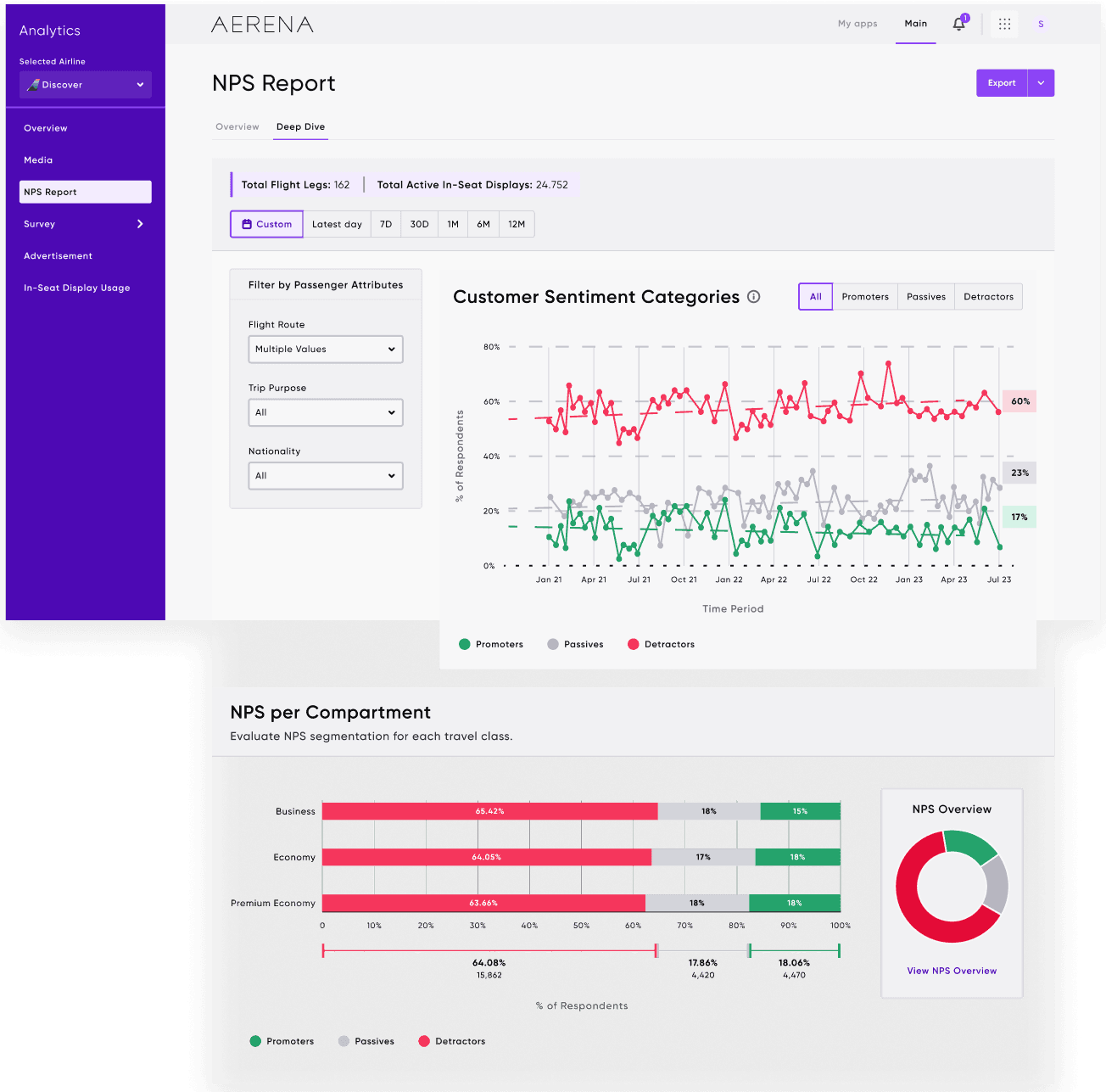
Customer sentiment categories tracked over time: Promoters, Passives, and Detractors visualised as proportional trends. NPS per Compartment view highlighting Business, Economy, and Premium Economy so teams can pinpoint which cabin class is driving satisfaction drops.
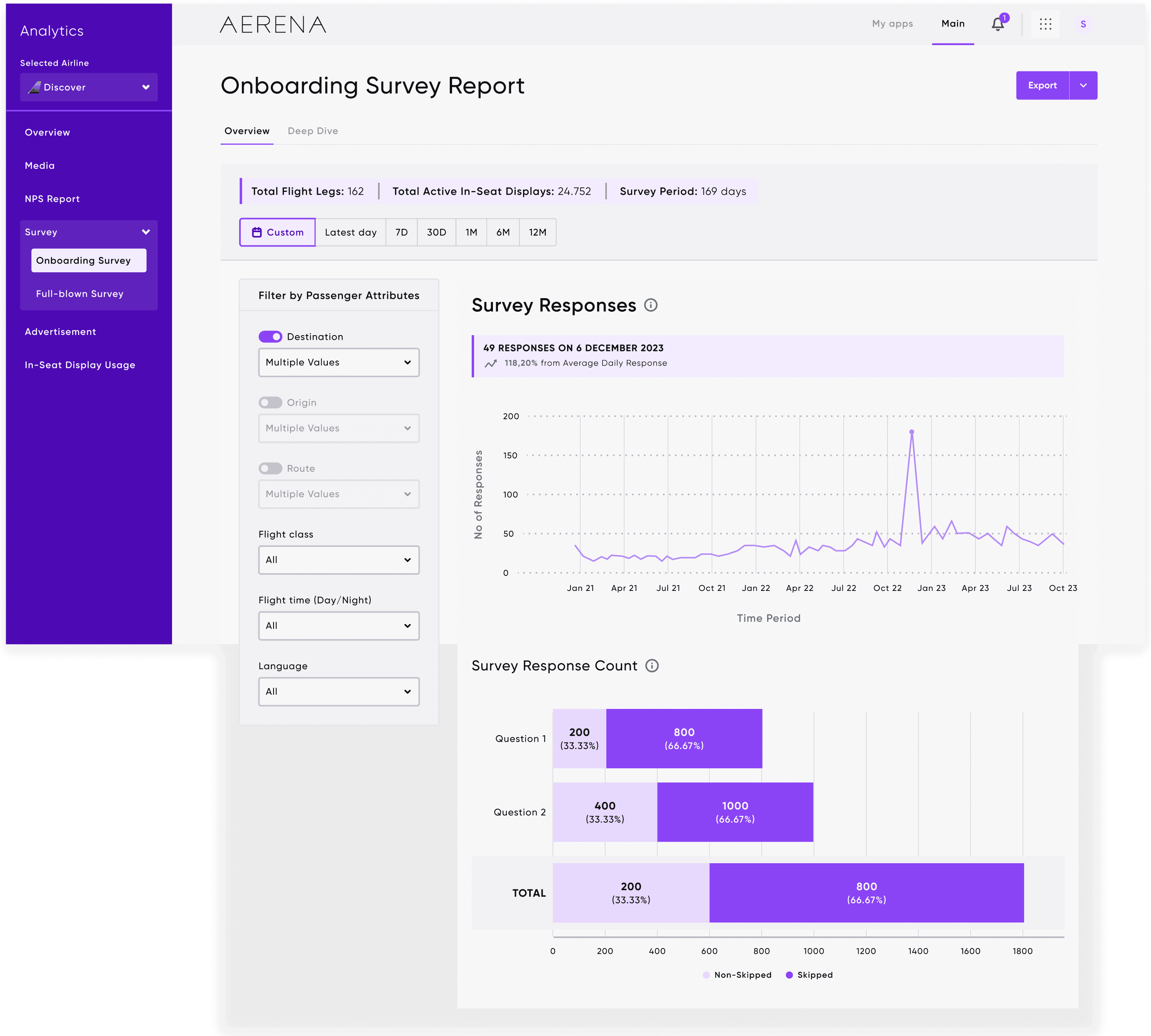
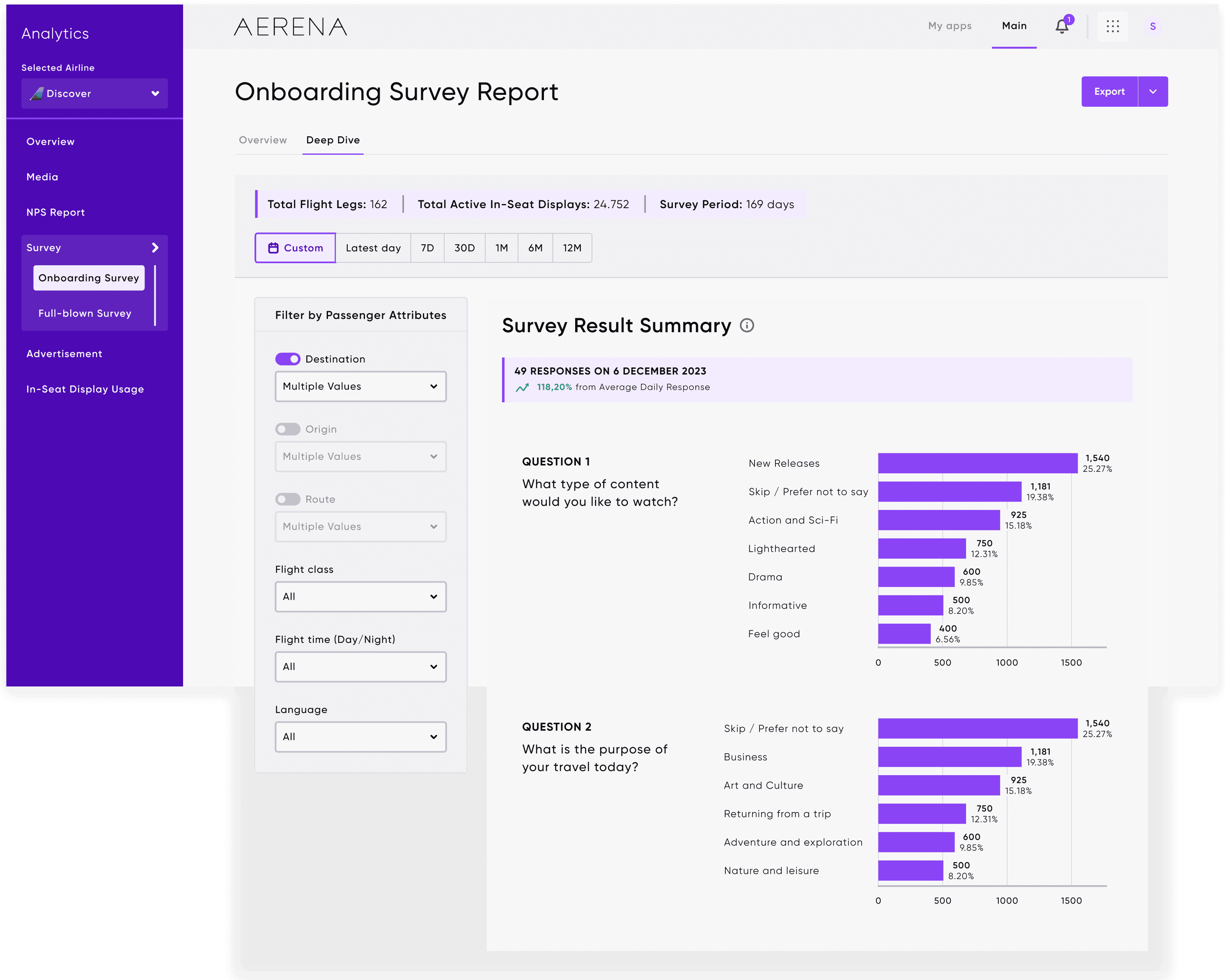
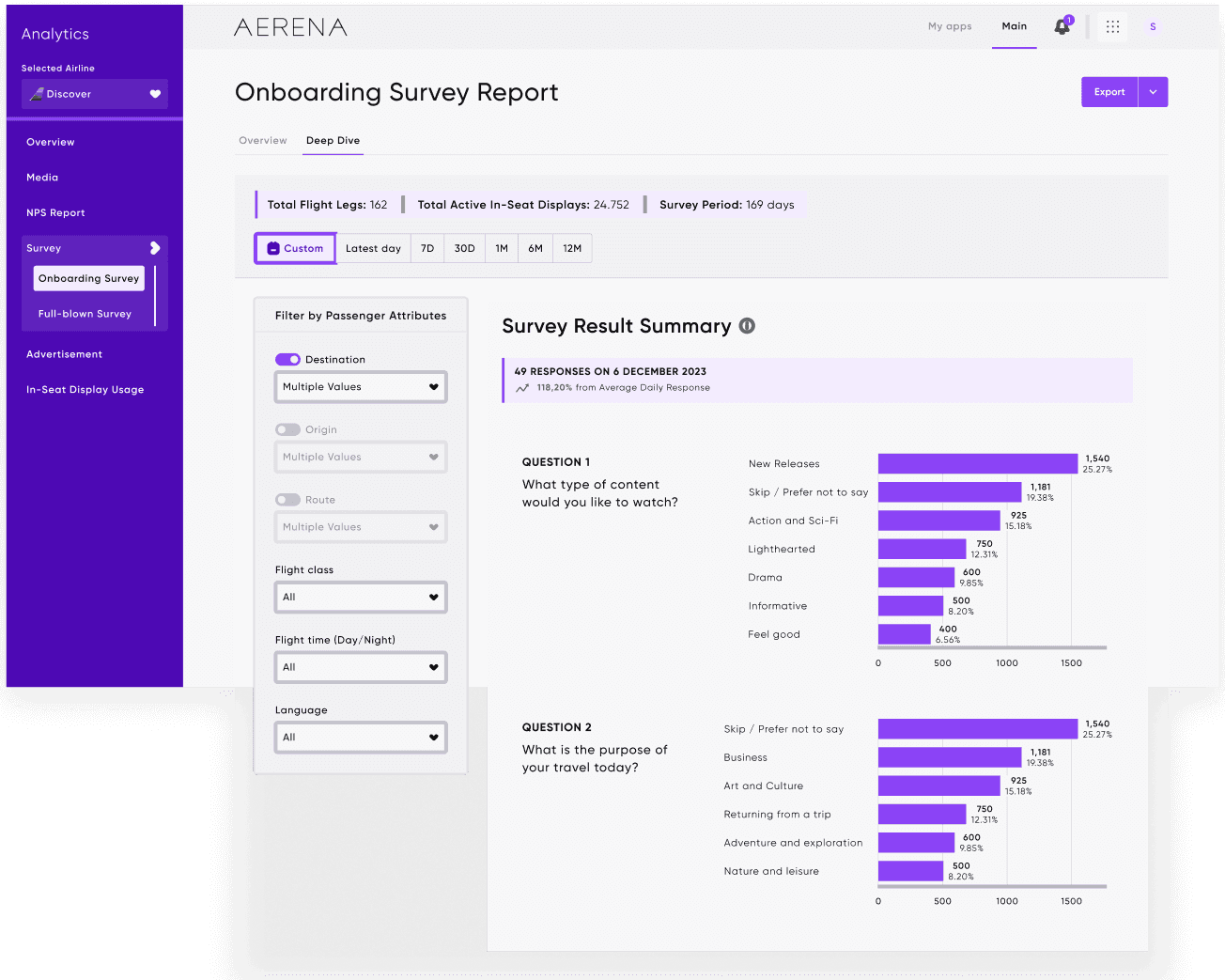
Onboarding Survey
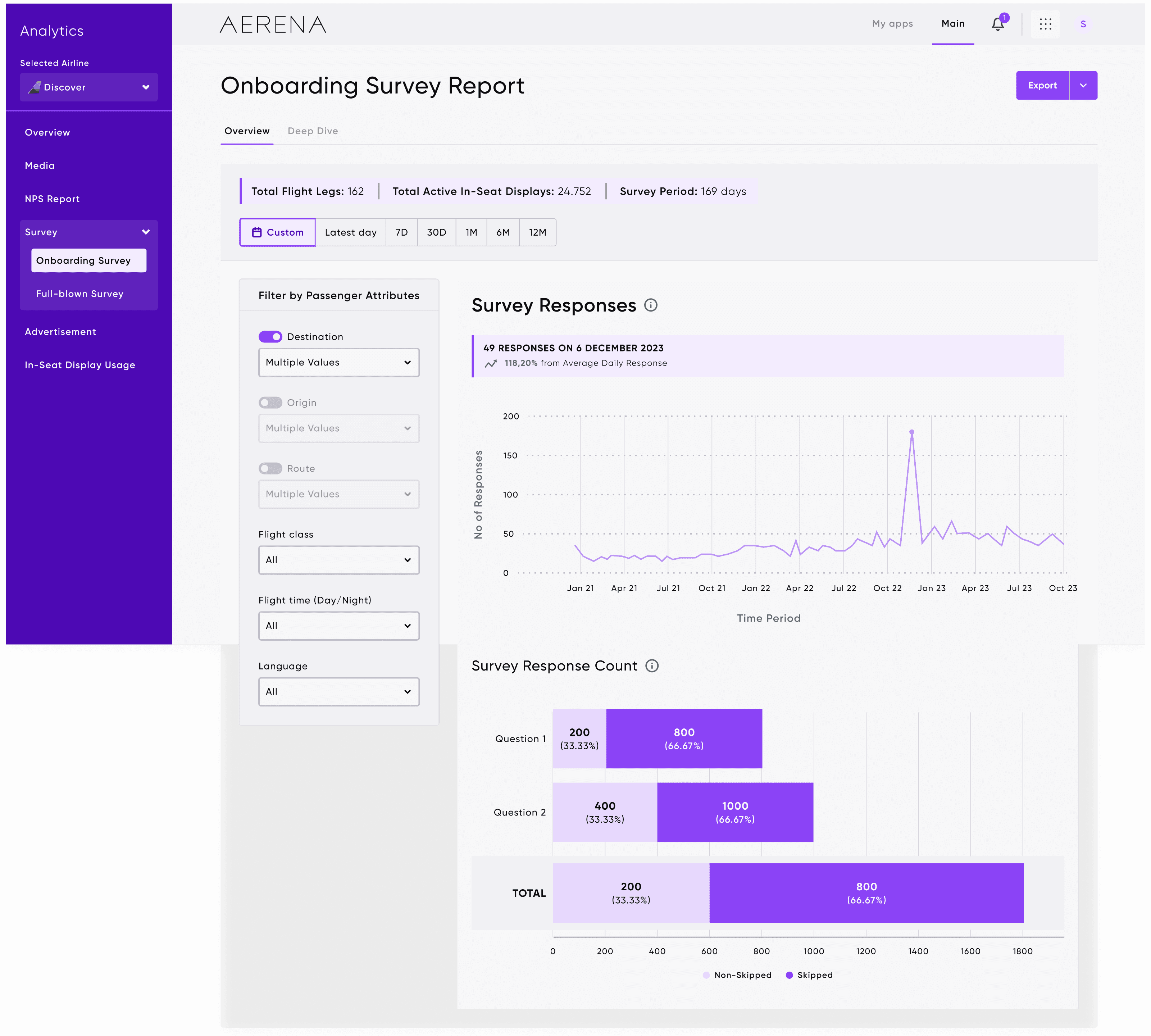
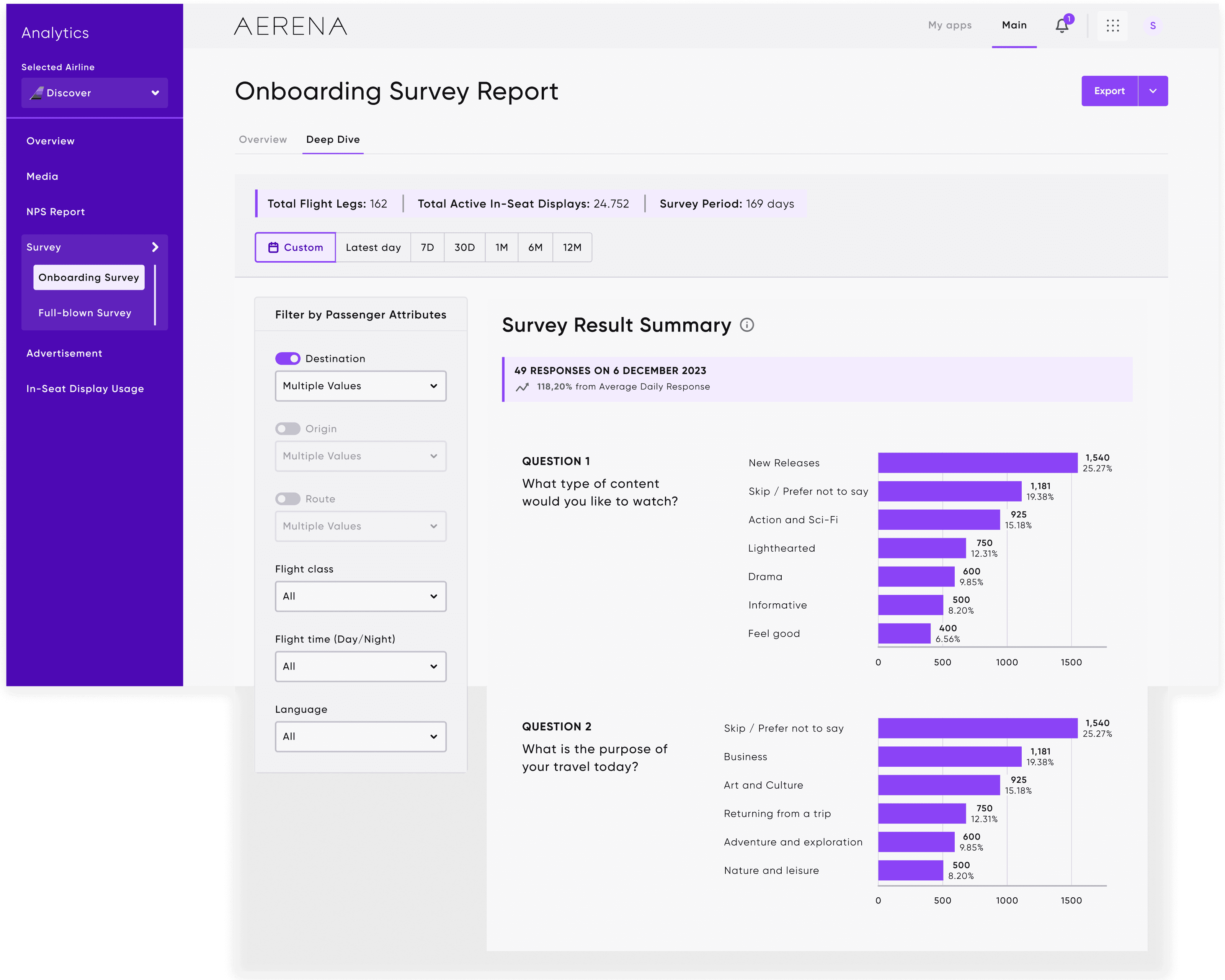
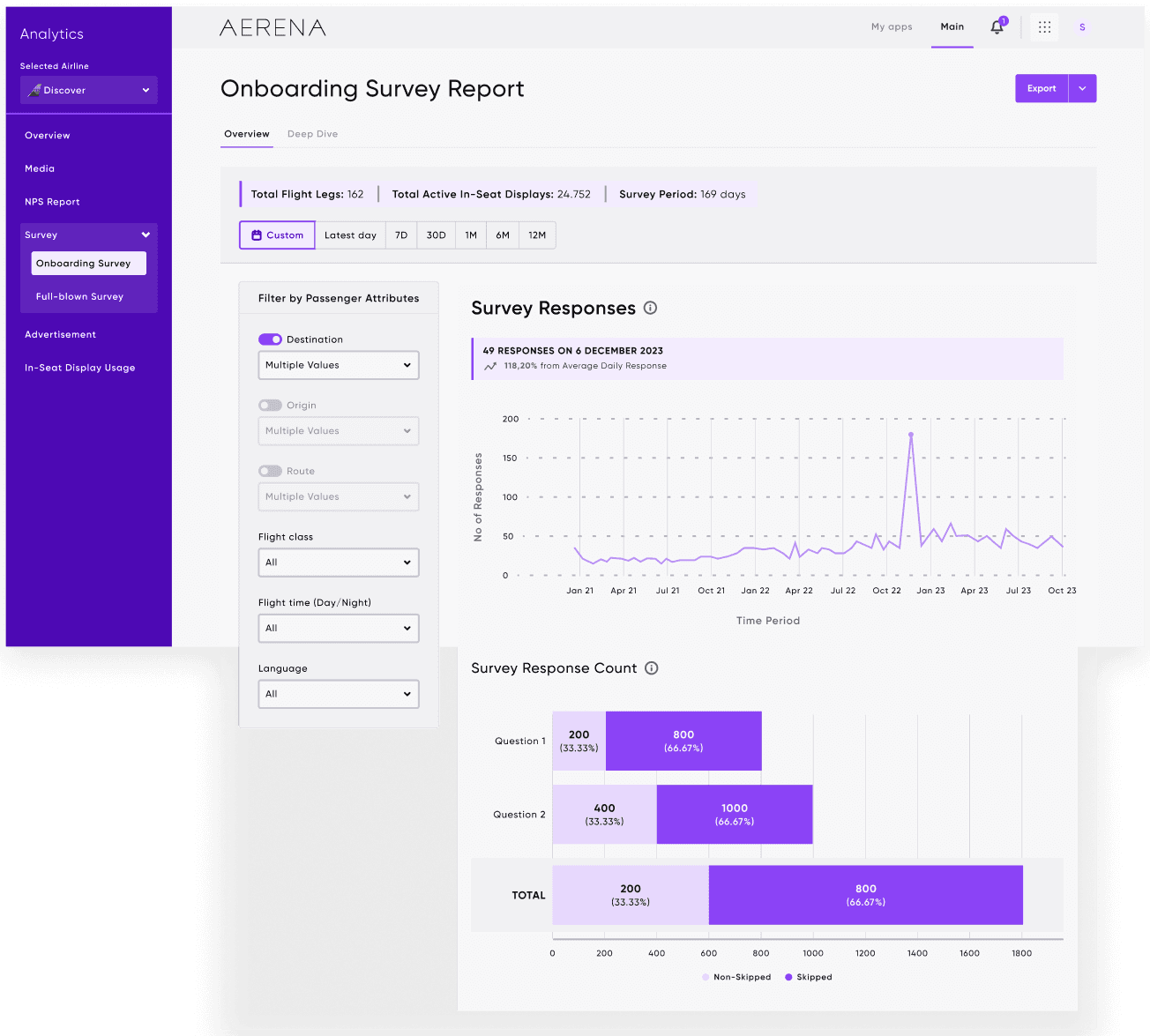
Response volume and quality breakdowns at a glance: how many passengers responded, and how complete their feedback was. Survey results mapped to key satisfaction areas including entertainment, seat comfort, and travel experience.
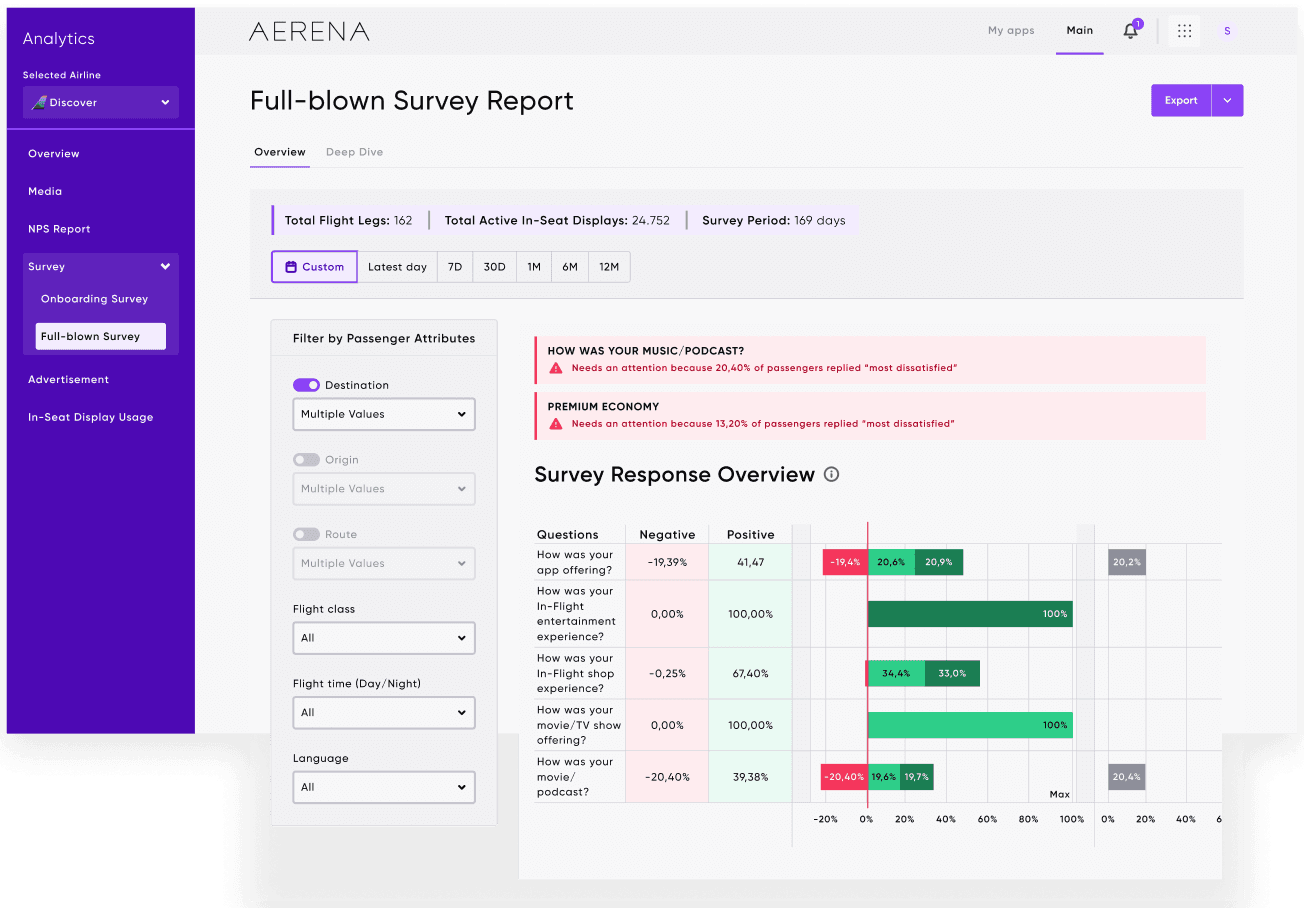
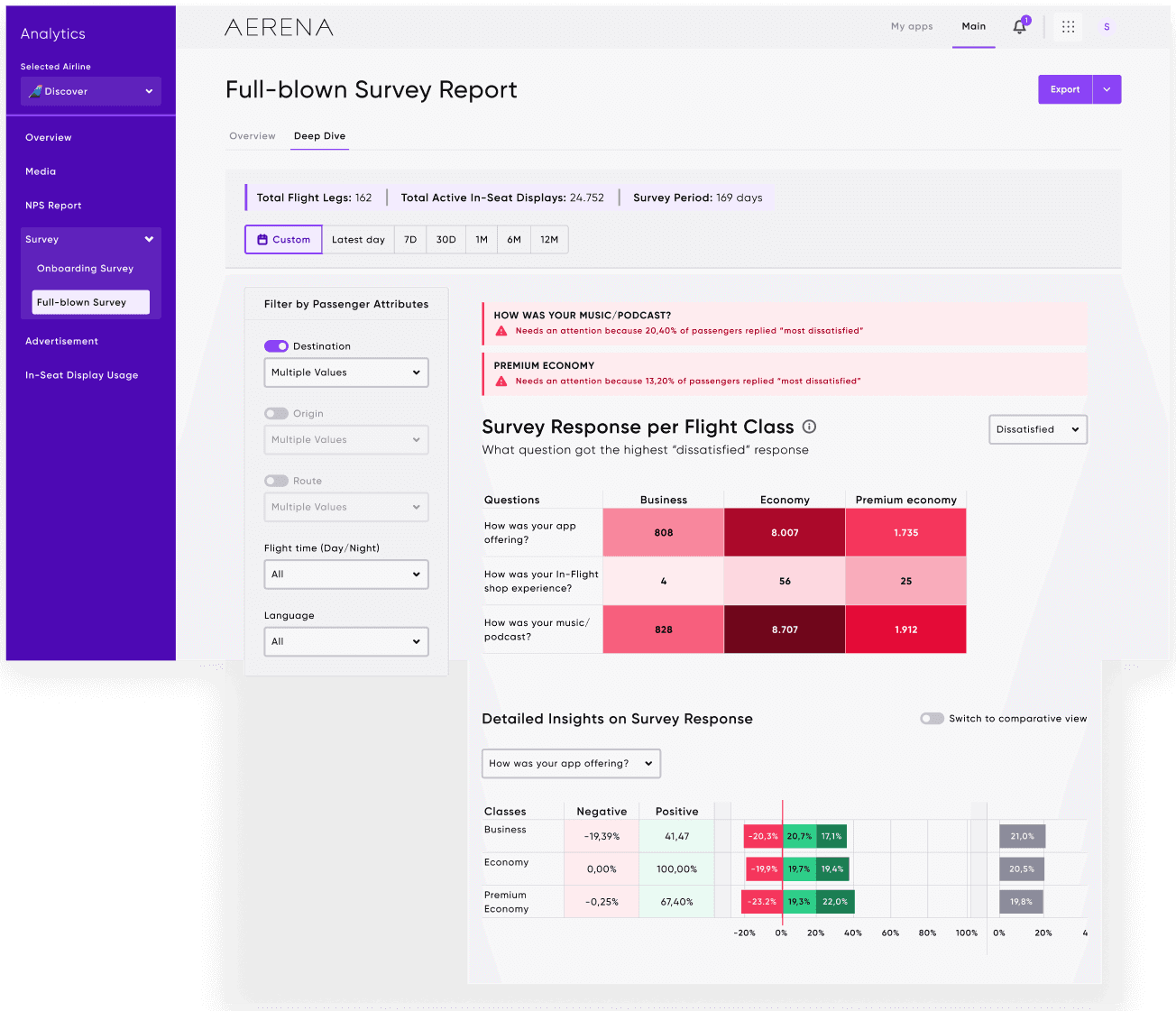
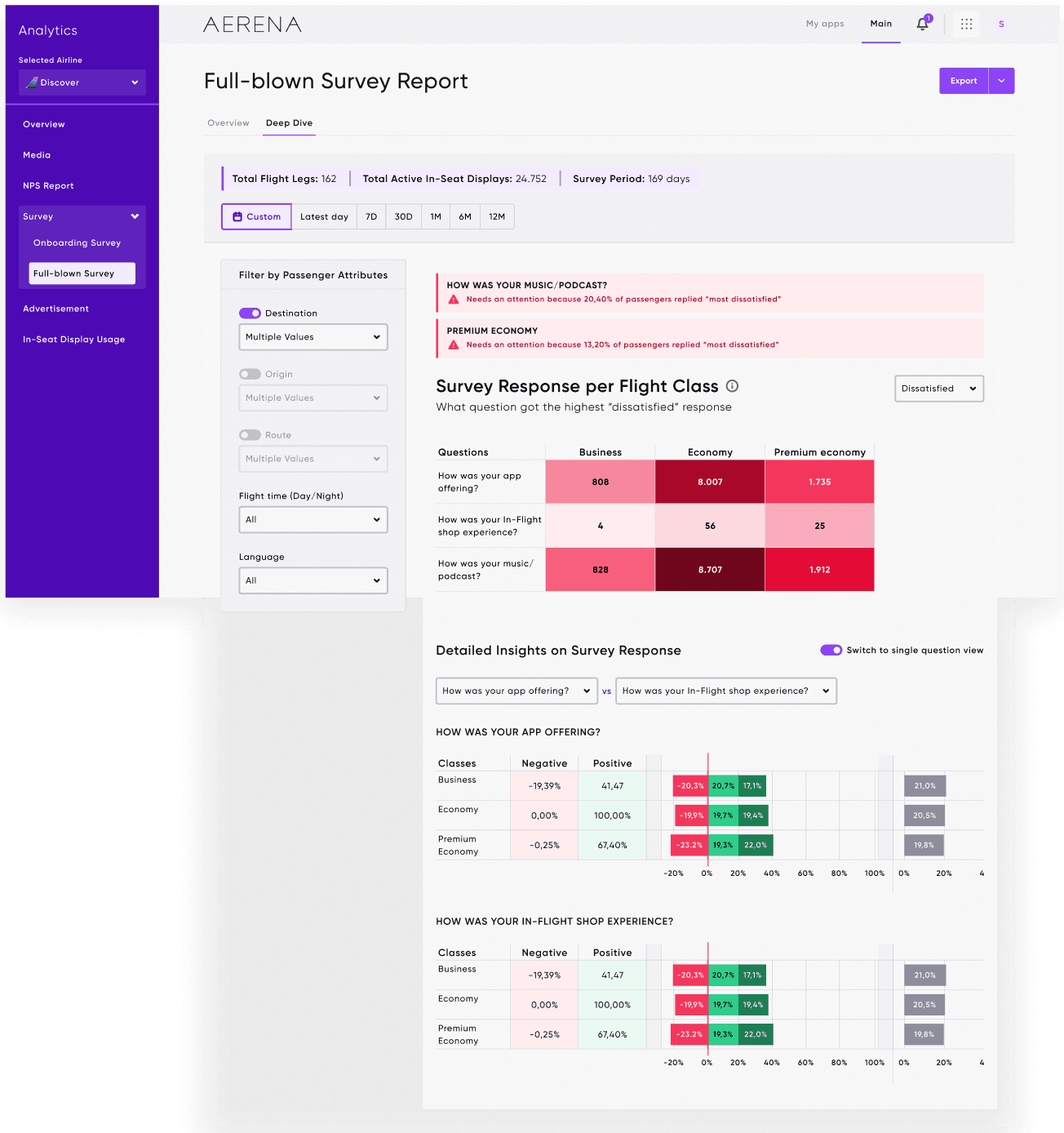
Full Survey
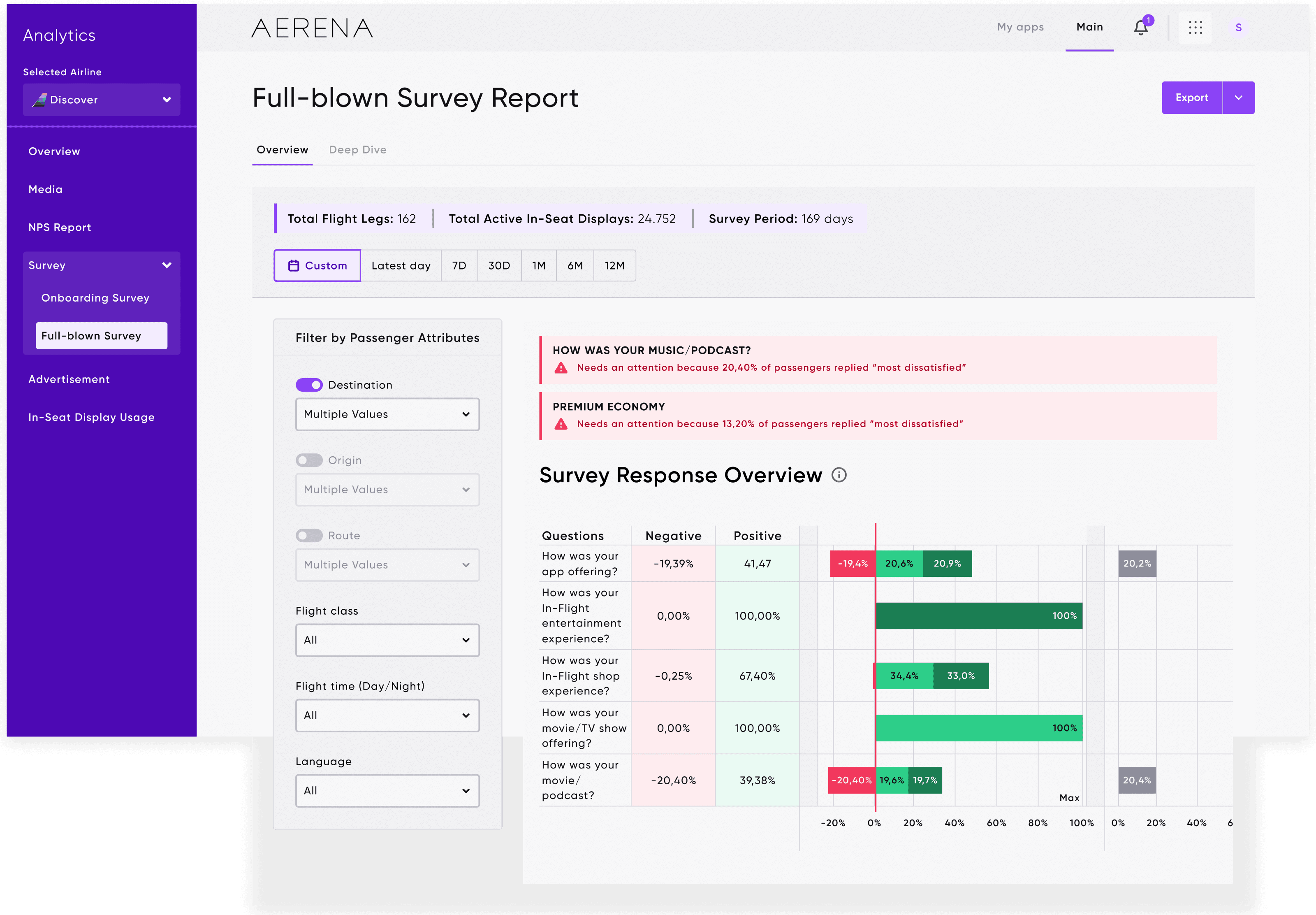
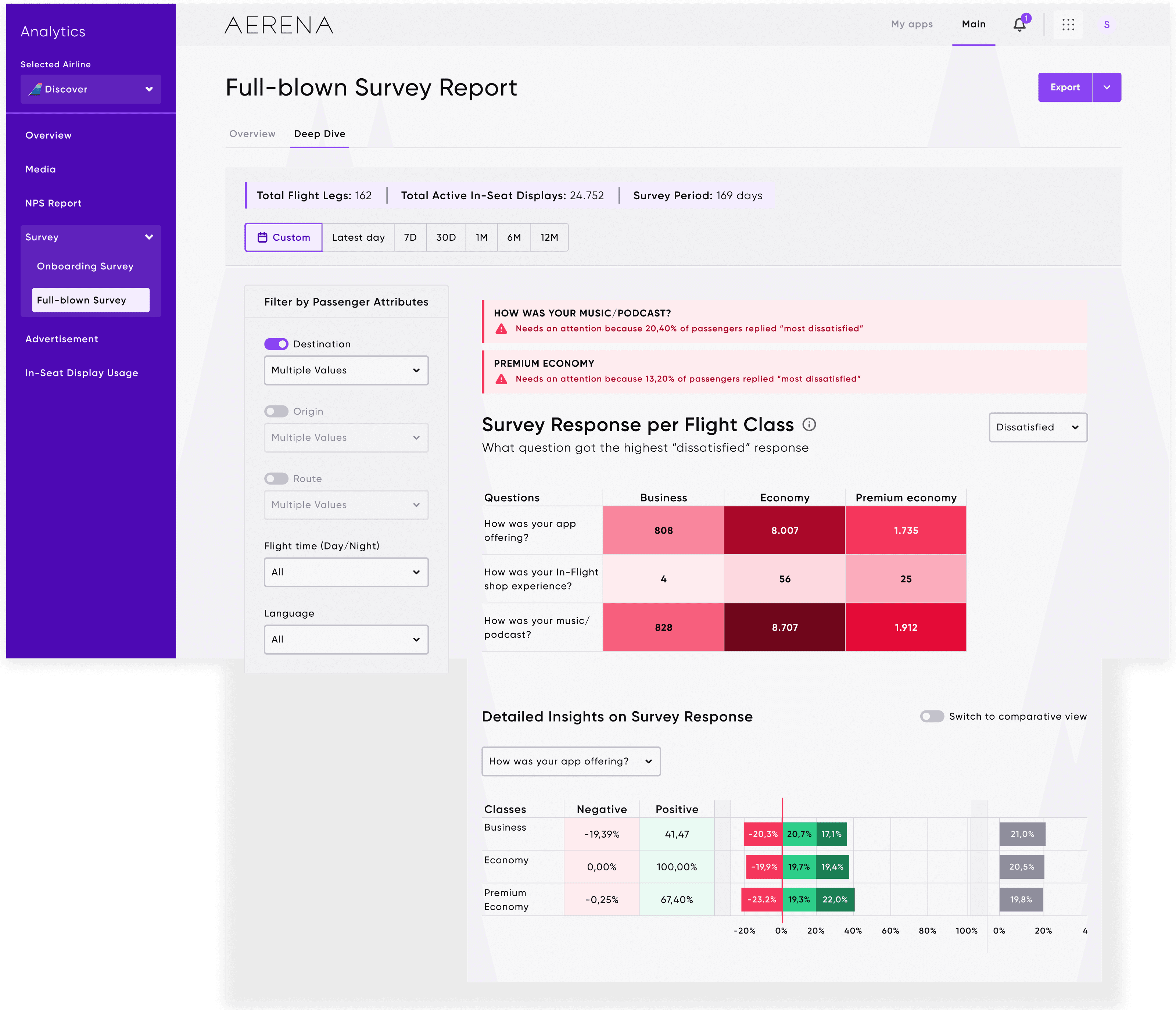
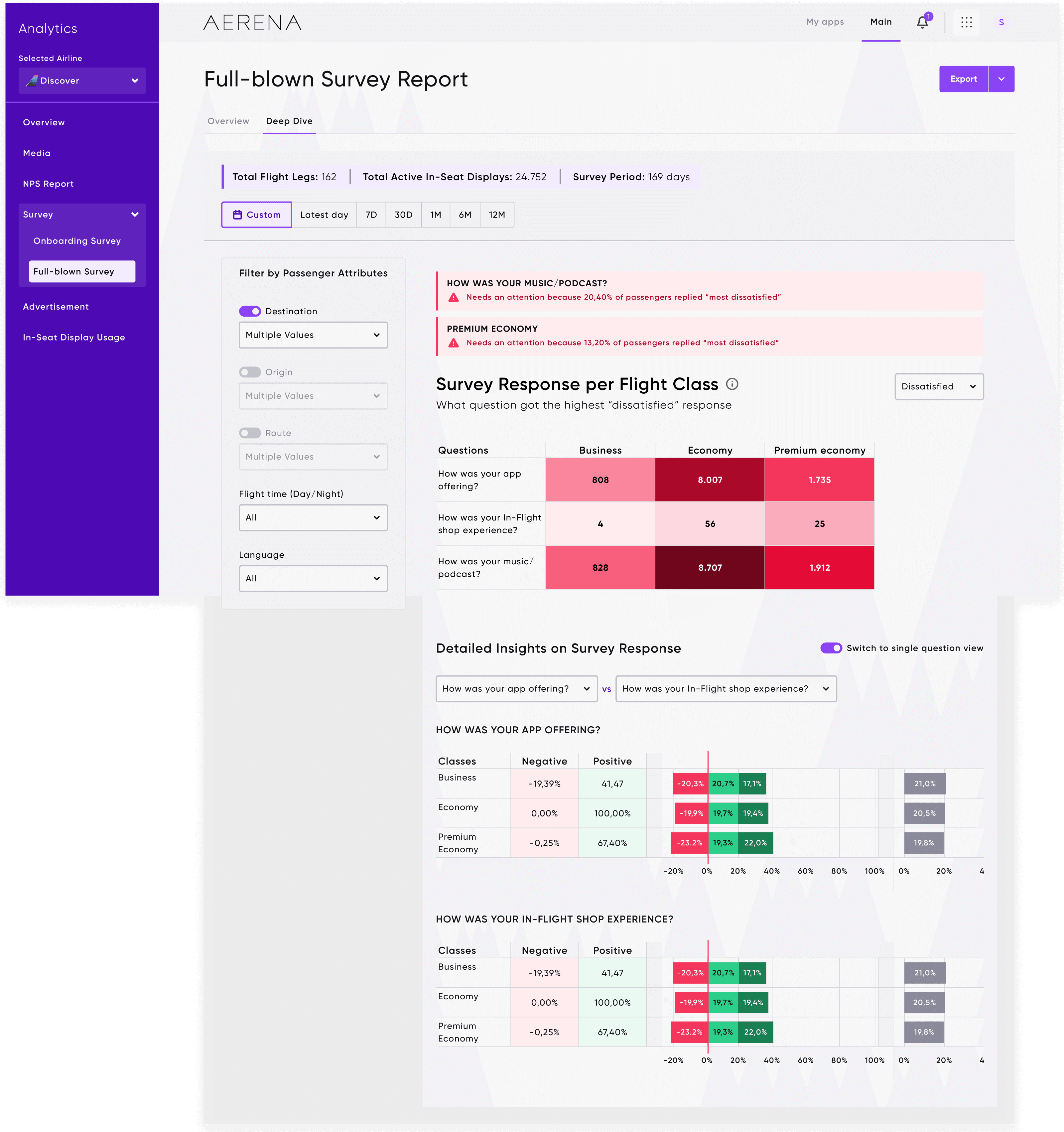
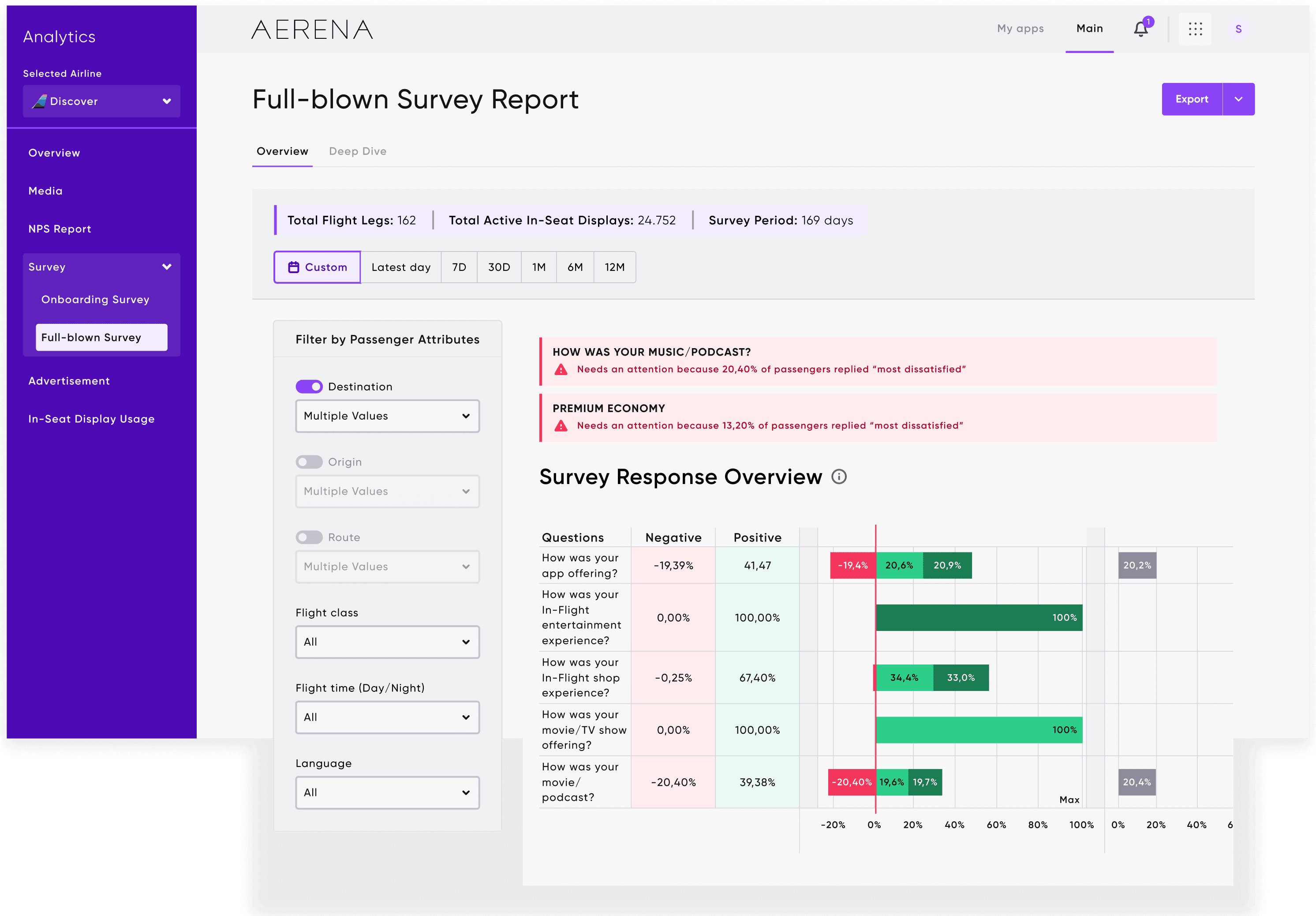
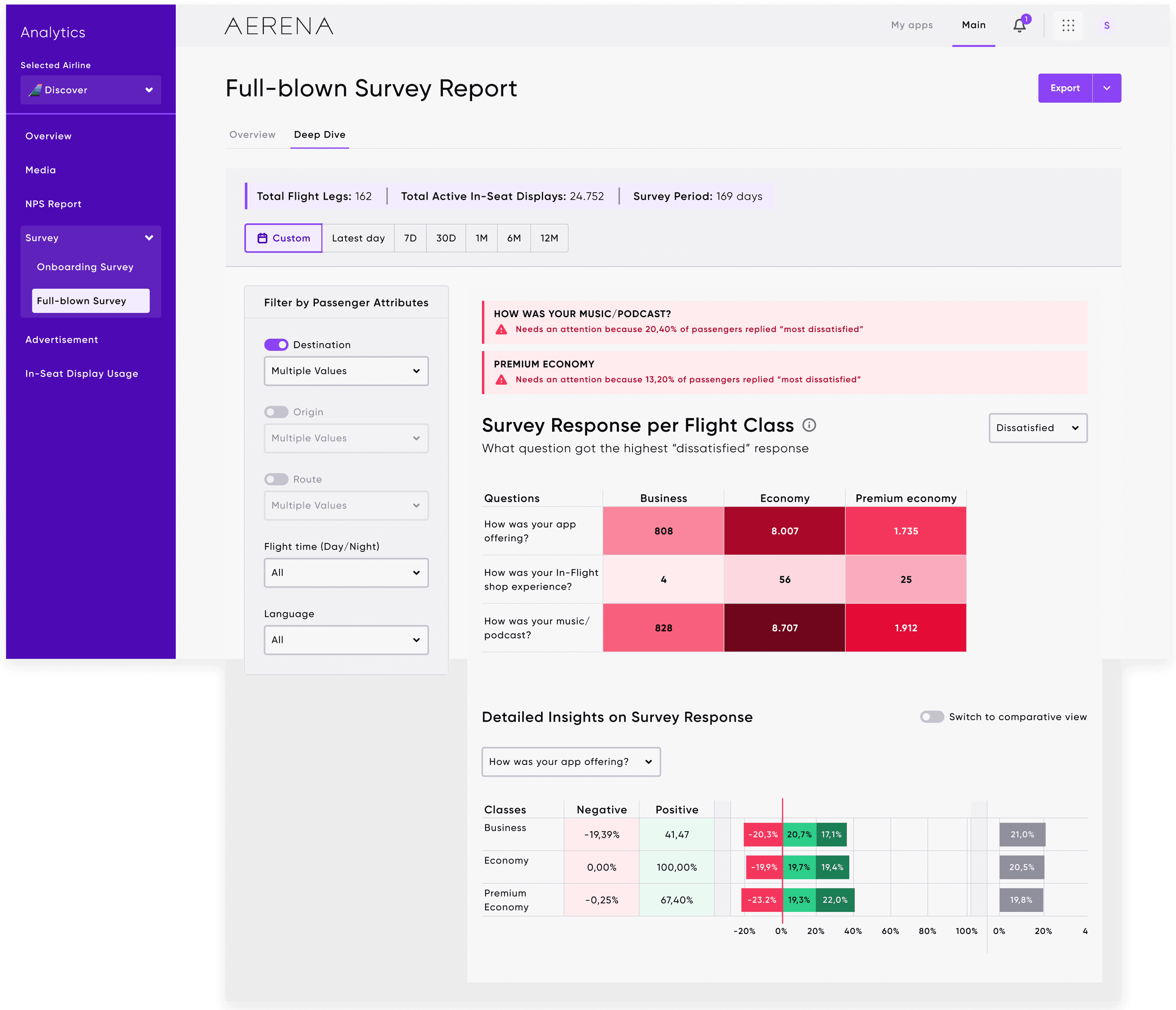
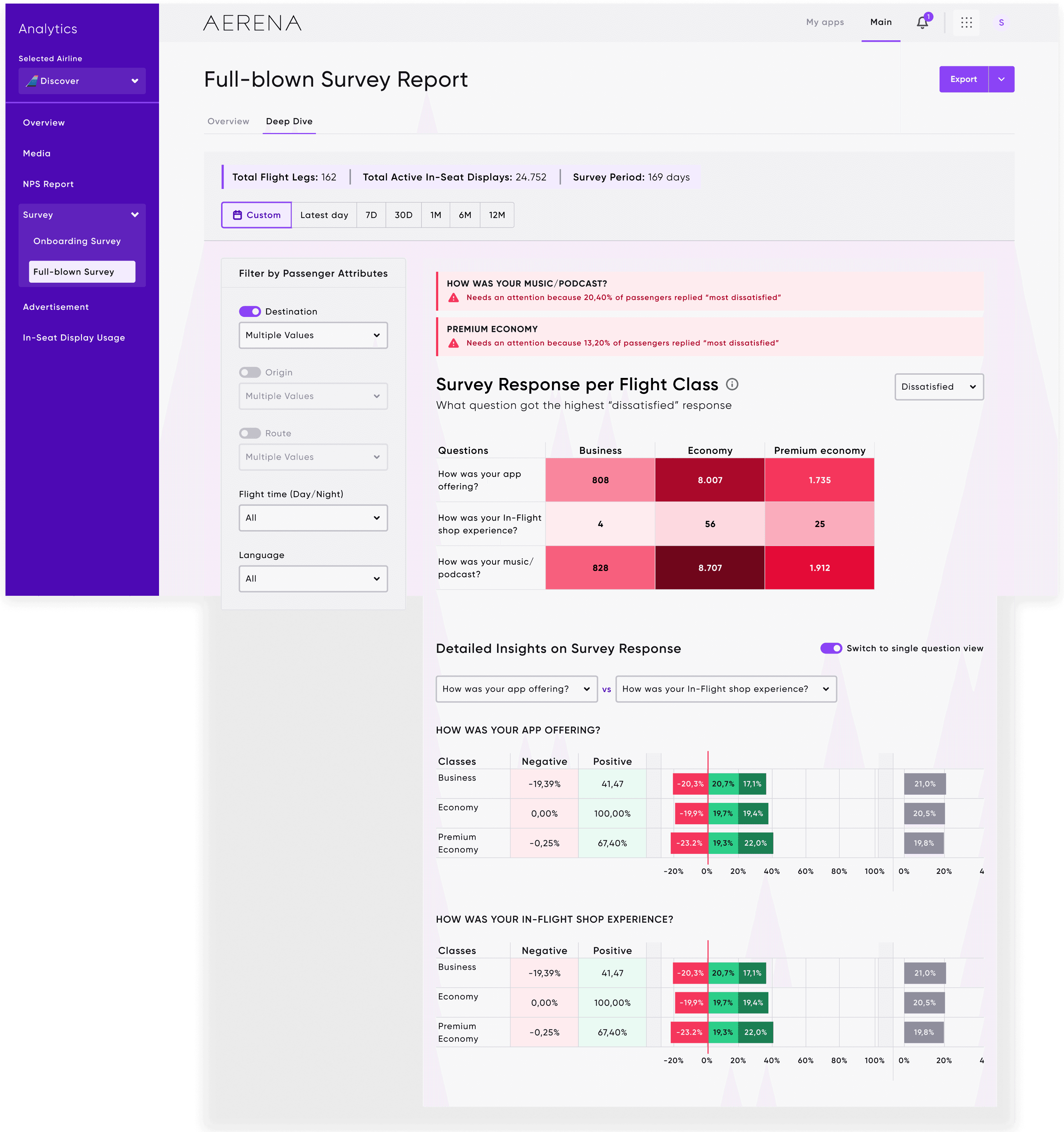
Visual alerts for dissatisfaction hotspots. Red flags surface automatically so teams don't have to hunt for problems. Detailed insights per question, per flight class, with comparative analysis tools for cross-route benchmarking.
Design Rationale
Global vs. local filter clarity: users always know whether they're scoping the entire dashboard or a single chart. Intuitive hierarchy balancing KPIs with drill-down opportunities, so power users can go deep without overwhelming casual viewers. High-contrast visual cues for critical insights like NPS drops and satisfaction alerts. Tooltips and microinteractions enhancing discoverability without adding noise.
Impact & Reflection
Outcomes
Surfaced compartment-specific issues, enabling targeted service improvements.
Enhanced cross-functional collaboration between marketing, operations, and CX teams.
Reflection & Takeaways
This project solidified key lessons in:
Balancing complexity and clarity when designing enterprise SaaS. You can't simplify the data, but you can simplify the path to it. The critical importance of progressive disclosure in data-heavy environments: show the signal first, let users pull the detail. Designing for both strategic decision-making (executives) and operational actionability (analysts) in the same interface.
This module shipped as a core part of AERENA's analytics suite. It reduced insight discovery time from hours to under 5 minutes and gave airline teams a single source of truth for passenger sentiment, replacing fragmented spreadsheets with a system they actually use daily.
Project Overview
AERENA is a modular digital platform developed by AERQ to transform the in-flight experience through digital engagement, operational empowerment, and data-driven intelligence. It offers airlines tools to manage media, apps, UI customisation, fleet health, and more.
Within AERENA, I led the UX design for the Analytics module—a core product empowering airlines to gain actionable insights from passenger sentiment data. The Analytics module supports stakeholders including airline operations managers, customer experience analysts, and marketing leads in transforming feedback into strategic decisions.
To comply with non-disclosure agreement, I have omitted and obfuscated confidential information in this case study. All information in this case study is my own and does not necessarily reflect the views & facts of the company.
Duration
3 months
My Role
UX Designer
Contribution
Problem Definition, Research & Analysis, Component Design, Mid & High-Fidelity Design
Team
Data Analyst; Data Engineer; Product Owner
Problem Statement & Design Goals
Airlines gather vast amounts of feedback across flights, classes, and timeframes, but traditionally struggle to translate this data into clear, actionable insights without heavy analytical effort.
Passenger sentiment trends
How might we help airline teams quickly understand passenger sentiment trends?
Flexible segmentation
How might we enable flexible segmentation by flight class, nationality, or trip purpose?
Make complex data intuitive
How might we present complex data in an intuitive, non-technical format?
Design Goals
Prioritise clarity, actionability, and usability.
Create a modular, scalable dashboard experience.
Reduce cognitive load while preserving analytical depth.
Research & Analysis
Through domain research and interviews with internal experts and airline stakeholders, I identified key user needs:
Better understanding of NPS drops
Difficulty correlating NPS drops with specific routes, classes, or trip types.
Consistent data interpretation
Fragmented tools causing inconsistent data interpretation.
Deeper investigation and quick grasp
Demand for fast, at-a-glance health checks and deeper investigative capabilities.
We developed three primary personas: Airline Ops Manager, CX Analyst, and Marketing Lead.
Design Process
Information Architecture
The Analytics experience was divided into two key layers:
Overview: High-level KPIs, current NPS scores, quick trends.
Deep Dive: Sentiment breakdowns, per-class analysis, detailed survey feedback.
Overview
Deep Dive
Overview
Deep Dive
Wireframes & Interaction Models
Initial wireframes focused on modular layouts, progressive filtering, and contextual drill-downs. Particular care was given to the positioning and clarity of filters affecting global and local views.
Component Design
I developed a system of reusable UI components, including filter panels, NPS visualisations, sentiment trend graphs, and survey breakdowns. Special attention was given to scale and consistency across use cases.
Data Visualisation Decisions
Donut charts: For NPS summaries and comparative deltas.
Stacked bar charts: For class segmentation of sentiment categories.
Trend lines and growth bars: For historical NPS performance.
Heatmaps: For detailed survey response distributions.
Final Solution
NPS Report – Overview
Donut visual summarising current NPS with past-period comparison.
Flight Route, Trip Purpose, and Nationality filters clearly scoped.
Timeline and growth views enabling granular exploration.
NPS Report – Deep Dive
Customer Sentiment Categories over time (Promoters, Passives, Detractors).
NPS per Compartment view highlighting Business, Economy, Premium Economy.
Onboarding Survey
Response volume and response quality breakdowns.
Survey result summaries linked to key entertainment and travel satisfaction areas.
Full-blown Survey
Visual alerts for dissatisfaction hotspots.
Detailed insights per question, per flight class, and comparative analysis tools.
Design Rationale
Global vs local filter clarity to manage scope.
Intuitive hierarchy balancing KPIs with drill-down opportunities.
High-contrast visual cues for critical insights.
Tooltips and microinteractions enhancing discoverability without noise.
Wrap up
Outcomes
Surfaced compartment-specific issues, enabling targeted service improvements.
Enhanced cross-functional collaboration between marketing, operations, and CX teams.
Reflection & Takeaways
This project solidified key lessons in:
Balancing complexity and clarity when designing enterprise SaaS experiences.
The critical importance of progressive disclosure in data-heavy environments.
Designing for both strategic decision-making and operational actionability.
By shaping AERENA Analytics, I contributed to AERQ’s broader mission of digitally transforming the in-flight experience and empowering airlines to operate smarter, faster, and closer to their passengers.
Next project →
Project Overview
AERENA is a modular digital platform developed by AERQ to transform the in-flight experience through digital engagement, operational empowerment, and data-driven intelligence. It offers airlines tools to manage media, apps, UI customisation, fleet health, and more.
Within AERENA, I led the UX design for the Analytics module—a core product empowering airlines to gain actionable insights from passenger sentiment data. The Analytics module supports stakeholders including airline operations managers, customer experience analysts, and marketing leads in transforming feedback into strategic decisions.
Duration
3 months
My Role
UX Designer
Contribution
Problem Definition, Research & Analysis, Component Design, Mid & High-Fidelity Design
Team
Data Analyst; Data Engineer; Product Owner
Problem Statement & Design Goals
Airlines gather vast amounts of feedback across flights, classes, and timeframes, but traditionally struggle to translate this data into clear, actionable insights without heavy analytical effort.
Passenger sentiment trends
How might we help airline teams quickly understand passenger sentiment trends?
Flexible segmentation
How might we enable flexible segmentation by flight class, nationality, or trip purpose?
Make complex data intuitive
How might we present complex data in an intuitive, non-technical format?
Design Goals
Prioritise clarity, actionability, and usability.
Create a modular, scalable dashboard experience.
Reduce cognitive load while preserving analytical depth.
Research & Analysis
Through domain research and interviews with internal experts and airline stakeholders, I identified key user needs:
Better understanding of NPS drops
Difficulty correlating NPS drops with specific routes, classes, or trip types.
Consistent data interpretation
Fragmented tools causing inconsistent data interpretation.
Deeper investigation and quick grasp
Demand for fast, at-a-glance health checks and deeper investigative capabilities.
We developed three primary personas: Airline Ops Manager, CX Analyst, and Marketing Lead.
Design Process
Information Architecture
The Analytics experience was divided into two key layers:
Overview: High-level KPIs, current NPS scores, quick trends.
Deep Dive: Sentiment breakdowns, per-class analysis, detailed survey feedback.
Overview
Deep Dive
Overview
Deep Dive
Wireframes & Interaction Models
Initial wireframes focused on modular layouts, progressive filtering, and contextual drill-downs. Particular care was given to the positioning and clarity of filters affecting global and local views.
Component Design
I developed a system of reusable UI components, including filter panels, NPS visualisations, sentiment trend graphs, and survey breakdowns. Special attention was given to scale and consistency across use cases.
Data Visualisation Decisions
Donut charts: For NPS summaries and comparative deltas.
Stacked bar charts: For class segmentation of sentiment categories.
Trend lines and growth bars: For historical NPS performance.
Heatmaps: For detailed survey response distributions.
Final Solution
NPS Report – Overview
Donut visual summarising current NPS with past-period comparison.
Flight Route, Trip Purpose, and Nationality filters clearly scoped.
Timeline and growth views enabling granular exploration.
NPS Report – Deep Dive
Customer Sentiment Categories over time (Promoters, Passives, Detractors).
NPS per Compartment view highlighting Business, Economy, Premium Economy.
Onboarding Survey
Response volume and response quality breakdowns.
Survey result summaries linked to key entertainment and travel satisfaction areas.
Full-blown Survey
Visual alerts for dissatisfaction hotspots.
Detailed insights per question, per flight class, and comparative analysis tools.
Design Rationale
Global vs local filter clarity to manage scope.
Intuitive hierarchy balancing KPIs with drill-down opportunities.
High-contrast visual cues for critical insights.
Tooltips and microinteractions enhancing discoverability without noise.
Wrap up
Outcomes
Surfaced compartment-specific issues, enabling targeted service improvements.
Enhanced cross-functional collaboration between marketing, operations, and CX teams.
Reflection & Takeaways
This project solidified key lessons in:
Balancing complexity and clarity when designing enterprise SaaS experiences.
The critical importance of progressive disclosure in data-heavy environments.
Designing for both strategic decision-making and operational actionability.
By shaping AERENA Analytics, I contributed to AERQ’s broader mission of digitally transforming the in-flight experience and empowering airlines to operate smarter, faster, and closer to their passengers.
To comply with non-disclosure agreement, I have omitted and obfuscated confidential information in this case study. All information in this case study is my own and does not necessarily reflect the views & facts of the company.
Next Case Study
How I reduced campaign setup friction by 40% and shifted teams from reactive reporting to real-time optimisation.
Say hello